What is FlexClip?
FlexClip is an AI-powered content creation platform designed to help users produce videos, visual assets, voiceovers, subtitles, presentations, and repurposed social media content from a single browser-based workspace.
In this hands-on FlexClip review, we evaluate how the platform performs across real-world content workflows — including AI video generation, content repurposing, subtitle automation, presentation-to-video conversion, social media production, and lightweight marketing asset creation.
Modern content production is no longer limited to simple video editing. As creators, marketers, educators, and businesses publish across multiple platforms, formats, and channels, the demand for fast multimedia production has increased significantly. Many modern AI tools now attempt to combine video creation, automation, repurposing, subtitles, voice generation, templates, and design workflows into unified production environments built for speed and scalability.
FlexClip positions itself within this rapidly expanding category as an accessible browser-based AI content creation platform. Instead of focusing purely on traditional editing, the platform combines multiple lightweight production layers into a single workflow environment — including AI video generation, text-to-speech, subtitle automation, presentation-to-video conversion, screen recording, image generation, and short-form content repurposing. Rather than targeting professional film editors or advanced motion designers, FlexClip is primarily designed for fast execution and simplified content production.
This review is based on our structured evaluation framework, which focuses on practical workflow performance, usability, output quality, scalability, and real-world production efficiency. The central question is therefore not whether FlexClip can compete with advanced desktop editing suites, but whether it meaningfully improves the speed, accessibility, and efficiency of modern content creation workflows.
This article contains affiliate links. We may earn a commission at no extra cost to you. All reviews remain independent and based on real evaluation.
Review Snapshot
FlexClip operates as a lightweight AI video creation platform within modern content workflows. It is not a professional cinematic editing suite, but a fast browser-based production environment designed to help users create videos, subtitles, presentations, screen recordings, and repurposed social content with minimal technical friction.
Creators, marketers, educators, small businesses, and teams that need fast AI-assisted video creation, subtitles, presentations, screen recordings, and social content production.
Advanced video editors, filmmakers, motion designers, and production teams that require cinematic editing, complex compositing, advanced color grading, or professional-grade timeline precision.
Pros
- Fast browser-based video creation
- Strong templates, subtitles, and repurposing workflows
- Accessible for creators, marketers, and educators
Cons
- Limited advanced editing depth
- Not built for cinematic AI video generation
- AI features still require manual workflow guidance
What Is FlexClip?
Core functionality explained
FlexClip is an AI-powered content creation platform that helps users create videos, visual assets, subtitles, voiceovers, presentations, and repurposed short-form content from a browser-based workspace. The platform combines video editing, templates, stock media, AI text-to-speech, AI subtitles, script generation, screen recording, and content repurposing tools into one lightweight production environment.
Rather than functioning only as a traditional video editor, FlexClip operates as a simplified multimedia creation layer within the broader AI content workflow ecosystem — transforming ideas, scripts, images, presentations, and raw assets into publishable video and marketing content.
What problem does it solve?
Modern content production is increasingly fragmented. Creators and businesses often need separate tools for video editing, subtitles, voiceovers, stock assets, presentations, screen recording, and social media formatting. That creates friction, slows production, and makes consistent publishing harder to scale.
FlexClip addresses this by bringing multiple creation tools into a single browser-based workflow. Users can move from idea to edited video faster, generate subtitles, convert presentations into video, record screens, create short-form content, and publish simple marketing assets without needing advanced desktop editing software.
Within real-world workflows, this places FlexClip firmly in the Creation stage, where raw inputs such as text, images, slides, recordings, and media assets are transformed into visible content outputs. It acts as a practical production layer that supports faster content creation, repurposing, and distribution.
Who is it built for?
FlexClip is built for creators, marketers, educators, small businesses, agencies, and teams that need fast multimedia production without the complexity of professional editing suites.
This includes use cases such as social media videos, product promos, tutorials, educational content, presentations, internal training videos, ads, subtitles, and repurposed short-form clips. It is especially relevant for users who value speed, simplicity, templates, and AI-assisted workflows over deep manual editing control.
It is less suited for advanced video editors, filmmakers, motion designers, or production teams that require cinematic control, complex compositing, detailed color grading, or professional-grade timeline precision. Instead, FlexClip fits best in environments where speed, accessibility, and scalable content output matter more than advanced post-production depth.
If you want to see how FlexClip works in practice, you can explore the platform directly.
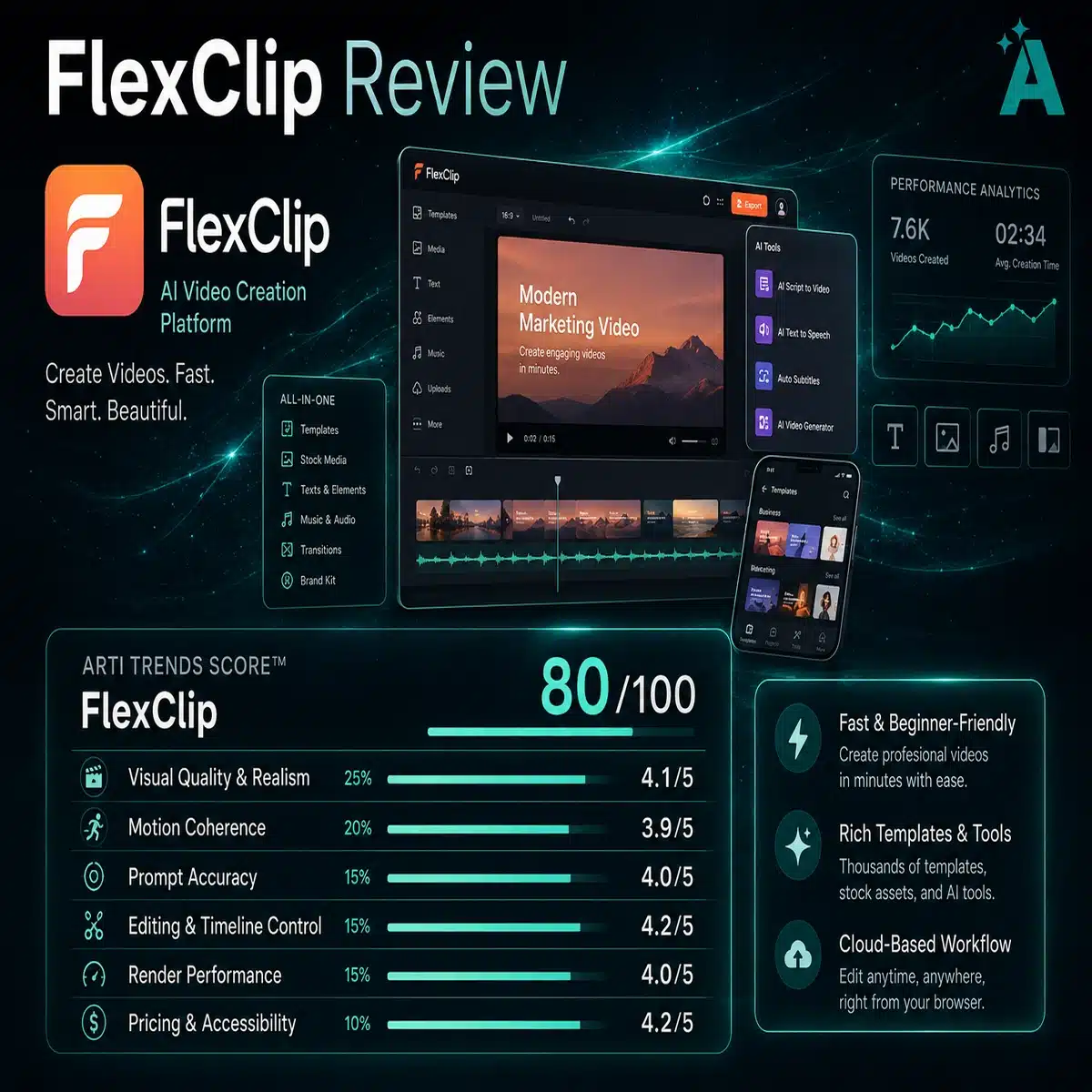
FlexClip Performance Breakdown (Arti-Trends Score)
FlexClip — AI Video Creation Platform
Key Features and Capabilities
Core features overview
FlexClip is designed as a lightweight AI-powered multimedia production platform focused on fast content creation and simplified editing workflows. Instead of specializing in a single capability, the platform combines multiple creation layers into one browser-based environment that supports video production, visual asset generation, subtitle automation, voiceovers, presentations, and content repurposing.
Its core feature set includes AI video generation, text-to-speech, auto subtitles, AI script generation, presentation-to-video conversion, screen recording, stock media integration, templates, image generation, and short-form content workflows. Together, these features allow users to move from idea to publishable content with minimal technical complexity.
The system is built to reduce friction inside modern content workflows by combining multiple lightweight production tools into a single interface. This makes it particularly effective for creators and teams that prioritize speed, accessibility, and publishing consistency across platforms.
Unique capabilities vs competitors
What differentiates FlexClip from more traditional video editors is its focus on workflow simplicity, accessibility, and AI-assisted production rather than deep professional editing control. Instead of competing directly with advanced desktop suites, the platform prioritizes rapid execution and low-friction content creation.
One of its strongest advantages is the breadth of integrated creation tools available inside a browser-based workflow. Users can generate subtitles, convert presentations into videos, create voiceovers, repurpose content into short clips, record screens, and assemble marketing assets without relying on multiple external tools.
Compared with heavier editing environments, FlexClip positions itself closer to a scalable content production layer than a professional post-production suite. This makes the platform especially attractive for social media workflows, educational content, internal business communication, and high-volume marketing production.
Limitations of the feature set
While FlexClip performs strongly as a speed-oriented creation platform, its feature set is not designed to replace advanced video production software. The platform is strongest at simplified multimedia creation and workflow acceleration — not at cinematic editing, complex compositing, or high-end motion design.
Users looking for professional-grade timeline precision, advanced color grading, detailed animation systems, or deep post-production flexibility may therefore find the platform limited compared with desktop editing environments.
In addition, many of the AI capabilities function primarily as workflow enhancement features rather than fully autonomous creative systems. Output quality still depends heavily on template selection, media quality, workflow structure, and user input.
How FlexClip Fits Into Real Workflows
Role inside the AI Workflow Stack
The Arti-Trends Workflow Stack™ explains how tools create value within real-world production environments rather than in isolation. Instead of evaluating platforms purely on feature count, the framework focuses on where a tool operates inside a workflow and how it contributes to measurable output efficiency.
FlexClip operates primarily in the Creation stage, where raw inputs such as text, images, presentations, recordings, and media assets are transformed into publishable content. Within this structure, the platform functions as a lightweight multimedia production layer designed to accelerate video creation, content repurposing, and marketing asset generation.
Unlike highly specialized AI systems that focus on a single transformation layer, FlexClip combines several creation-oriented capabilities into one browser-based workflow environment.
Where it creates the most value
Within modern marketing and content workflows, the Creation stage is directly tied to production speed, publishing consistency, and content scalability. The faster teams can transform ideas into finished assets, the easier it becomes to maintain distribution across multiple platforms and formats.
FlexClip creates the most value by reducing production friction. Instead of moving between separate editing, subtitle, voiceover, recording, and presentation tools, users can manage lightweight production workflows inside one interface.
This is especially valuable for:
- social media workflows
- short-form content production
- internal business communication
- educational content
- marketing assets
- rapid repurposing workflows
The platform is strongest in environments where speed and accessibility matter more than deep creative control.
However, its influence outside the Creation stage remains limited. It does not define upstream research or strategy (Input), nor does it function as an automation engine (Execution) or analytics platform (Optimization). Its value is therefore concentrated around fast asset production rather than full workflow orchestration.
Example real-world workflow
In a typical content workflow, FlexClip is used after ideas, messaging, or scripts have already been defined. The platform then transforms those inputs into visible multimedia assets that can be distributed across channels.
Text, presentations, images, recordings, or scripts are processed into videos and short-form content, after which teams can export and distribute the assets across platforms.
Input → Define strategy, messaging, scripts, or campaign concepts
Processing → Generate supporting assets such as AI scripts, subtitles, or voiceovers
Creation → Produce videos and multimedia content with FlexClip
Execution → Publish and distribute content across platforms
Optimization → Analyze engagement, performance, and audience response
This illustrates that FlexClip does not replace the entire workflow, but acts as a practical creation layer that accelerates content production within larger marketing and media systems.
Performance and Output Quality
Output quality evaluation
FlexClip delivers strong output quality for lightweight browser-based multimedia production, particularly within social content, marketing videos, presentations, tutorials, and template-driven workflows. Videos generated inside the platform are visually clean, easy to customize, and immediately usable for online publishing without requiring advanced editing knowledge.
Unlike professional desktop editing suites that prioritize deep manual control, FlexClip focuses on reducing production friction through simplified workflows and AI-assisted tooling. This allows users to move from raw assets to publishable content significantly faster, especially for short-form and high-volume production environments.
The platform performs best when users combine strong templates, structured content inputs, quality visuals, and clear workflow organization. AI-assisted features such as subtitles, script generation, presentation conversion, and text-to-speech improve production efficiency, but the final quality still depends heavily on media selection and workflow execution.
As a result, FlexClip should not be viewed as a replacement for high-end cinematic editing software, but rather as a scalable content production layer optimized for speed and accessibility.
Speed and scalability
One of FlexClip’s strongest advantages is production speed. The platform dramatically reduces the time required to create videos, subtitles, presentations, and social content compared with more traditional editing workflows.
What would normally require multiple tools, timeline editing, asset management, and export processes can often be completed inside a single browser-based environment. This has a direct impact on workflow efficiency, particularly for creators and businesses producing content at scale.
In environments where publishing consistency and turnaround speed matter — such as social media marketing, internal communication, online education, and short-form video production — this level of accessibility becomes a meaningful operational advantage.
The combination of templates, stock assets, AI utilities, and simplified editing workflows allows teams to produce significantly more content with lower technical overhead.
Consistency and reliability
FlexClip delivers strong consistency within its intended use cases, especially for template-based production and repeatable marketing workflows. Users can maintain relatively stable branding, formatting, subtitles, and content structure across multiple projects without requiring advanced editing expertise.
However, consistency depends heavily on the workflow itself. Since the platform emphasizes accessibility over deep control, outputs can become repetitive or visually generic if users rely too heavily on default templates and automated assets.
The AI-assisted features also vary in impact depending on the complexity of the project. Subtitle generation and presentation conversion perform reliably for lightweight workflows, while more advanced creative projects still require manual refinement and editing judgment.
The platform should therefore be viewed as a high-efficiency creation environment that prioritizes repeatable output and workflow speed rather than maximum creative precision.
Real-World Performance Insight
In practical environments, the impact of FlexClip is most visible in production efficiency, publishing speed, and content scalability. By consolidating multiple lightweight creation tools into one platform, users can reduce workflow complexity and produce multimedia content faster with fewer technical barriers.
Rather than fundamentally transforming creative strategy or storytelling itself, FlexClip improves how quickly content moves from concept to distribution. This makes the platform especially valuable for creators and organizations that prioritize content velocity, consistency, and operational simplicity across modern digital channels.
Pricing and Value for Money
Pricing structure explained
FlexClip operates on a tiered subscription model that scales based on export quality, storage limits, stock asset access, AI feature availability, and overall production capacity. The platform typically offers a free plan for lightweight experimentation and basic editing workflows, followed by paid tiers that unlock higher-resolution exports, premium templates, expanded AI functionality, and increased project flexibility.
This positions FlexClip within the affordable-to-mid-range segment of AI content creation platforms, where pricing is designed around accessibility and scalable multimedia production rather than enterprise infrastructure deployment.
Unlike highly specialized AI generation systems that price primarily around API consumption or compute usage, FlexClip focuses more on workflow access and production capabilities inside a browser-based creation environment. Users are effectively paying for a combination of editing functionality, AI utilities, templates, stock media access, and export scalability.
Each pricing tier is structured to support different production levels. Casual creators and occasional users can operate comfortably on lower plans, while marketers, agencies, educators, and businesses producing larger content volumes benefit more from premium tiers with expanded export and AI-generation limits.
As content production intensity increases, the platform becomes more operationally valuable because it consolidates multiple lightweight creation workflows into one environment. However, users producing highly advanced or cinematic content may still require additional professional editing software outside the platform.
Pricing Overview
| Plan | Best For | Key Access |
|---|---|---|
| Free | Individuals testing video creation workflows | Basic editing tools, limited exports, restricted AI functionality, FlexClip branding |
| Plus | Creators and casual content production | Higher-quality exports, expanded templates, larger stock library, increased project flexibility |
| Business | Marketers, educators, and growing teams | Premium assets, advanced AI tools, branding support, larger storage and export capacity |
| Enterprise / Team Use | Agencies and scalable content workflows | Higher production scalability, collaboration support, larger workflow capacity, expanded commercial usage |
Value for Money in Practice
The real value of FlexClip is not measured by subscription cost alone, but by how much production friction it removes across modern content workflows.
In traditional environments, creating marketing videos, subtitles, presentations, voiceovers, and social assets often requires multiple tools, editing software, stock libraries, and export workflows. This introduces operational complexity, increases production time, and creates bottlenecks for creators and teams trying to publish consistently.
FlexClip simplifies this process by consolidating lightweight multimedia production into a single browser-based environment. Instead of managing separate tools for editing, subtitles, templates, presentations, and short-form repurposing, users can move from concept to publishable content significantly faster.
For creators, marketers, educators, and businesses, this is where the platform delivers its strongest return on investment: faster production cycles, lower technical overhead, simplified workflows, and the ability to scale content output without requiring advanced editing expertise.
Is it worth the cost?
The value of FlexClip depends heavily on workflow intensity and production needs. For creators and teams producing content regularly — especially for social media, education, marketing, or internal communication — the platform can significantly reduce production time and workflow complexity, making it a highly efficient lightweight production environment.
In these workflows, return on investment is driven primarily by speed, accessibility, publishing consistency, and reduced dependency on multiple external tools. However, for highly advanced video production environments requiring cinematic editing, complex compositing, or professional post-production control, the platform’s limitations become more noticeable.
FlexClip delivers the most value when fast multimedia production and content scalability matter more than deep technical editing precision.
Best plan by use case
For individuals and early-stage creators, the free plan provides enough functionality to explore basic editing workflows, templates, subtitles, and lightweight video production.
The Plus plan is generally the most balanced option for active creators and marketers, offering improved export quality, expanded asset access, and greater workflow flexibility for regular publishing.
Business-oriented plans are best suited for agencies, educators, brands, and teams producing larger content volumes or managing more consistent multimedia workflows. In these environments, FlexClip shifts from a simple editing tool into a scalable content production layer that supports faster asset creation and distribution.
View current pricing and plans on FlexClip.
Pros and Cons
Key advantages
FlexClip delivers its strongest value in environments where production speed, accessibility, and scalable content creation directly influence publishing efficiency and output volume.
Fast multimedia production
The platform dramatically reduces the time required to create social videos, presentations, subtitles, tutorials, and marketing assets. Browser-based editing and AI-assisted workflows allow users to move from concept to publishable content with minimal technical friction.
Beginner-friendly workflow design
FlexClip is highly accessible compared with traditional editing software. Templates, simplified editing controls, stock assets, subtitles, and AI utilities lower the learning curve and make multimedia production easier for non-technical users.
All-in-one lightweight creation environment
The platform combines multiple production layers — including video editing, AI subtitles, text-to-speech, screen recording, templates, stock media, and content repurposing — into a single workflow environment. This reduces dependency on separate lightweight production tools.
Strong short-form and marketing workflow fit
FlexClip performs especially well for social media content, educational workflows, business communication, repurposed clips, and high-volume marketing production where speed matters more than advanced editing depth.
Key limitations
The platform’s focus on speed and accessibility also introduces clear limitations.
Limited professional editing depth
FlexClip is not designed for advanced cinematic editing, detailed compositing, professional motion graphics, or complex post-production workflows. Users requiring high-end creative control may quickly encounter platform limitations.
Template dependency
While templates improve production speed, overreliance on them can lead to visually repetitive or generic outputs if workflows are not customized carefully.
AI features are workflow enhancers, not autonomous systems
Most AI capabilities inside FlexClip function as production accelerators rather than fully autonomous creative engines. Final output quality still depends heavily on media selection, workflow structure, and user editing decisions.
Limited enterprise-grade workflow infrastructure
Compared with API-first production systems or enterprise creative infrastructure platforms, FlexClip remains primarily a browser-based UI environment with more limited automation and orchestration depth.
When this becomes a real limitation
In environments where professional-grade editing precision, cinematic storytelling, advanced animation systems, or collaborative post-production workflows are required, FlexClip can feel restrictive compared with more advanced editing suites.
Teams working on high-end commercial production, filmmaking, broadcast workflows, or complex brand campaigns may still require professional desktop software for deeper creative control and post-production flexibility.
Similarly, users expecting fully AI-generated end-to-end video production may find that the platform still requires substantial manual workflow guidance and template-based structuring to achieve polished results.
Alternatives and Competitors
FlexClip vs Alternatives
To understand where FlexClip fits best, it helps to compare it with other AI video and browser-based content creation platforms. The goal is not to identify a universal winner, but to show which tool creates the most value in each workflow.
| Tool | Core Strength | Main Limitation | Best Use Case | Workflow Role |
|---|---|---|---|---|
|
FlexClip
Best for fast multimedia creation
|
Fast browser-based video creation with AI tools, templates, subtitles, and repurposing workflows
i
Strong for creators and teams that need to create videos, subtitles, presentations, screen recordings, and social content without complex editing software.
|
Less advanced than professional editing suites for cinematic control and complex timeline work
i
Best used as a lightweight production layer, not as a replacement for advanced tools like Premiere Pro, DaVinci Resolve, or high-end motion design platforms.
|
Creators, marketers, educators, and businesses needing fast publishable multimedia content
i
Best for social videos, marketing assets, tutorials, presentations, subtitles, internal training, and content repurposing.
|
Creation • Multimedia layer |
|
Canva
|
All-in-one visual design ecosystem with strong templates, brand assets, and simple video creation
i
Stronger when the workflow combines graphics, presentations, social assets, brand kits, documents, and lightweight video in one design-first environment.
|
Less focused on dedicated video workflows and AI-assisted multimedia production depth
i
Excellent for design and brand consistency, but not always the most focused option for video-first production, subtitles, screen recording, or repurposing workflows.
|
Teams creating branded visuals, presentations, social graphics, and simple marketing videos
i
Best when visual consistency, templates, brand kits, and broad design assets matter more than deeper video workflow specialization.
|
Creation • Design layer |
|
VEED
|
Browser-based video editing with strong subtitle, recording, collaboration, and creator workflow features
i
Strong fit for teams and creators managing online video editing, captions, screen recordings, podcast-style video workflows, and collaborative production.
|
Can feel more editing-focused and less template-driven for quick general-purpose asset creation
i
Often better for editing and caption workflows, while FlexClip can feel faster for template-based promos, presentations, and lightweight marketing videos.
|
Creators and teams needing browser-based editing, captions, recordings, and collaborative video workflows
i
Useful for creators, educators, and teams that produce talking-head videos, subtitle-heavy content, product explainers, and social-first edits.
|
Create / Refine • Video layer |
|
CapCut
|
Short-form social video editing with creator-friendly effects, mobile workflows, and trend-based production tools
i
Stronger for TikTok-style editing, mobile-first creator workflows, short-form effects, fast cuts, captions, and social-native video production.
|
Less suited for business presentations, template-based marketing assets, and broader multimedia workflows
i
Excellent for creators and short-form social workflows, but less positioned as a business-friendly multimedia production suite.
|
Social creators, influencers, and teams producing fast short-form platform-native video
i
Best for short-form social content, mobile editing, trend-driven video formats, quick captions, and creator-first video workflows.
|
Create • Social video layer |
|
InVideo
|
AI-assisted text-to-video workflows and template-based video generation for marketing content
i
Stronger when users want to turn prompts, scripts, or text inputs into structured videos with AI-assisted generation and marketing-oriented templates.
|
Can be less flexible for manual editing and broader multimedia workspace use
i
Good for AI-assisted video generation, but not always as flexible as tools designed around broader editing, presentations, and mixed media production.
|
Marketers and creators turning scripts, prompts, or articles into structured videos quickly
i
Useful for explainer videos, marketing content, promotional videos, list-style content, and AI-assisted video generation workflows.
|
Creation • AI video layer |
FlexClip is not trying to be the most advanced video editor or the most design-heavy creative suite. Its strength is speed: a browser-based multimedia production environment for users who need to create videos, subtitles, presentations, screen recordings, and repurposed content quickly. Canva is stronger for design systems, VEED is stronger for editing and subtitle-heavy creator workflows, CapCut dominates short-form social editing, and InVideo leans further into AI-assisted text-to-video generation. FlexClip stands out as a practical creation layer for fast, accessible multimedia production.
Final Verdict
Who should use FlexClip
FlexClip is best suited for creators, marketers, educators, small businesses, and teams that need to produce multimedia content quickly without the complexity of professional editing software.
This includes social media videos, product promos, tutorials, presentations, internal training content, subtitles, screen recordings, and repurposed short-form assets. In these environments, the platform functions as a practical creation layer that reduces production friction and helps users move from idea to publishable content faster.
When embedded in a structured content workflow, FlexClip can significantly improve production speed, publishing consistency, and output scalability.
Who should avoid it
FlexClip is less suitable for advanced video editors, filmmakers, motion designers, or production teams that require deep creative control, advanced compositing, cinematic editing, detailed color grading, or professional post-production workflows.
It is also not ideal for users who expect fully autonomous AI video generation without manual guidance. Many of FlexClip’s AI features work best as workflow accelerators, not complete replacements for creative direction, editing judgment, or asset selection.
Overall recommendation
FlexClip is not a professional editing suite, nor is it designed to replace every component in a modern creative stack. Its strength lies in making multimedia production faster, simpler, and more accessible.
For creators and teams where speed, templates, subtitles, presentations, and lightweight video production matter most, it offers strong practical value. For advanced production teams, its limitations will become more visible.
FlexClip is a strong option for users who want a browser-based AI content creation platform that helps turn ideas, scripts, slides, recordings, and assets into publishable content with minimal friction.
Start Using FlexClip Today
If you’re looking for a fast, browser-based AI content creation platform for videos, presentations, subtitles, screen recordings, and multimedia workflows, FlexClip offers one of the most accessible lightweight production environments available today.
Try FlexClip →