Introduction — AI Content Creation Has Become an Operating System
AI content creation tools are no longer just writing assistants, image generators, or creative shortcuts. In 2026, they have become the operating layer behind modern content production.
Creators use them to turn ideas into articles, visuals, videos, podcasts, newsletters, ads, social posts, and full content campaigns. Marketing teams use them to scale output without multiplying headcount. Founders use them to move faster, test more angles, and build an audience with fewer bottlenecks.
But the real advantage is not speed alone.
The real advantage is creative leverage.
With the right AI content stack, one strong idea can become a complete content ecosystem: a blog post, a LinkedIn thread, a YouTube script, a short-form video, a newsletter, a carousel, a voiceover, and a set of branded visuals.
That changes how content works. Instead of creating one asset at a time, AI allows creators and businesses to build repeatable workflows that move from idea to research, from draft to design, and from publishing to repurposing.
AI does not make weak ideas strong. But it can help strong ideas travel further.
This guide breaks down the best AI content creation tools in 2026, how they work, which tools to use for writing, images, video, audio, and content repurposing, and how to build a practical AI workflow that improves output without sacrificing originality, accuracy, or brand control.
What You’ll Learn in This Guide
- what AI content creation tools are and how they work
- which tools are best for writing, visuals, video, audio, and repurposing
- how to choose the right AI tool for your workflow
- how to build a scalable AI content stack
- how to use prompts, templates, and workflows to create better content faster
- where AI still falls short, including accuracy, originality, copyright, and brand risk
Whether you are a creator, marketer, founder, student, agency, or business owner, AI content creation tools can help you create more — but the winners will be the people who use them with strategy, taste, and editorial judgment.
This guide is part of the AI Tools Hub, where we map, compare, and explain the most important AI tools for creators, professionals, and businesses. If you are new to the broader AI tools landscape, start with AI Tools — The Ultimate Guide (2026).
What Are AI Content Creation Tools? Explained Simply
AI content creation tools are software platforms that use artificial intelligence to help you plan, write, design, edit, publish, and repurpose content across multiple formats.
They can create blog posts, social media captions, emails, landing page copy, product descriptions, scripts, visuals, videos, voiceovers, thumbnails, newsletters, and campaign assets. But the best tools do more than generate content on command.
They help you move faster through the entire creative process: from idea to research, from outline to draft, from draft to final version, and from one finished asset to many platform-specific formats.
AI content tools turn creativity into a repeatable, scalable workflow.
That is the real shift. These tools are not just “content generators.” They are becoming the workflow layer behind modern content operations.
They Create Content Across Multiple Formats
Modern AI content creation tools are increasingly multimodal. That means they can work with more than one type of input or output, including text, images, audio, video, files, screenshots, and structured data.
For creators and businesses, this matters because content rarely lives in one format anymore. A single idea may need to become a blog post, a LinkedIn post, a short-form video, an email, an image, and a voiceover.
| Content type | What AI can help create | Common use cases |
|---|---|---|
| Text | Articles, emails, scripts, ads, outlines, summaries | Blogging, SEO, newsletters, landing pages, social posts |
| Images | Illustrations, thumbnails, product visuals, concept art | Blog visuals, campaigns, social media, branding |
| Video | Short clips, explainers, avatar videos, animations | Marketing videos, tutorials, YouTube, TikTok, training |
| Audio | Voiceovers, narration, podcast intros, spoken scripts | Courses, videos, podcasts, ads, accessibility |
| Repurposed content | Platform-specific versions of existing content | Turning one article into posts, scripts, emails, and clips |
This is why AI content creation is no longer only about writing faster. It is about turning one strong idea into a complete content ecosystem.
They Support Every Stage of the Creative Workflow
The best AI content tools do not only help at the final writing stage. They support the full workflow, from early thinking to final distribution.
- Ideation: generating angles, hooks, topics, campaign ideas, and content formats.
- Research: summarizing information, comparing sources, extracting key points, and identifying gaps.
- Structuring: turning rough ideas into outlines, frameworks, sections, and content briefs.
- Drafting: producing first versions of articles, emails, scripts, captions, and landing pages.
- Editing: improving clarity, tone, structure, grammar, readability, and brand consistency.
- Visual creation: generating images, thumbnails, graphics, product mockups, and campaign visuals.
- Repurposing: transforming one piece of content into multiple versions for different platforms.
Instead of starting from a blank page, you start with momentum. The creator still makes the strategic decisions, but AI removes much of the friction between idea and execution.
This is closely connected to building smarter AI workflows: repeatable systems that help you produce better content with less manual effort.
They Help Maintain Tone, Style, and Brand Consistency
One of the biggest advantages of AI content creation tools is consistency. A strong tool can follow instructions about tone of voice, formatting, structure, vocabulary, audience level, and brand positioning.
For a solo creator, this makes it easier to publish regularly without sounding different every week. For a business, it helps teams produce content that feels like one unified brand instead of a collection of disconnected voices.
- Use the same tone across blog posts, emails, and social content.
- Apply consistent formatting and content structure.
- Reuse proven messaging frameworks.
- Adapt one brand voice to different platforms and audiences.
- Reduce repetitive editing work across large content libraries.
Strong prompting makes this even more powerful. If you want better control over tone, structure, and output quality, read our AI Prompt Writing Guide.
They Reduce Creative Friction
Traditional content production often requires several separate roles: writer, editor, designer, video editor, voiceover artist, SEO specialist, and social media manager.
AI does not remove the need for human judgment. But it compresses many repetitive steps into one faster creative process.
That means creators and teams can spend less time on mechanical tasks and more time on strategy, storytelling, originality, audience insight, creative direction, and business goals.
AI does not replace taste. It gives people with taste more leverage.
This is where the difference between beginners and professionals becomes clear. Beginners use AI to get started. Professionals use AI to build systems.
They Work Best When Humans Stay in Control
The biggest mistake is treating AI content tools like automatic publishing machines. AI can generate fast drafts, but speed alone does not create trust, authority, or originality.
The strongest results come from a human-led workflow where AI supports the process, but people remain responsible for strategy, fact-checking, judgment, editing, and final quality.
- AI provides speed.
- Humans provide taste.
- AI provides options.
- Humans provide direction.
- AI provides drafts.
- Humans provide trust.
That balance is what separates generic AI content from useful, credible, brand-worthy content.
In Short: AI Content Tools Are Creative Infrastructure
AI content creation tools help transform raw ideas into finished assets. They support writing, design, video, audio, repurposing, editing, and distribution. But their real value is bigger than individual output.
They give creators, marketers, founders, agencies, and businesses a practical system for creating more content with better structure, stronger consistency, and less friction.
In 2026, the best AI content creation tools are not just apps. They are the creative infrastructure behind modern content production.
To understand how these tools fit into the wider AI software landscape, explore our AI Tools Ultimate Guide.
Benefits of AI Content Creation Tools
AI content creation tools do more than help you publish faster. Their real value is that they change the economics of content creation.
They reduce friction, improve consistency, expand creative options, and make it possible to turn one strong idea into multiple useful assets across different platforms.
For creators, marketers, founders, agencies, and businesses, this creates a new kind of advantage: not just more output, but a smarter and more scalable content system.
The real benefit of AI content tools is not automation. It is creative leverage.
Faster Content Production
The most obvious benefit of AI content creation tools is speed. AI can help with research, outlines, drafts, rewrites, summaries, visuals, video scripts, captions, emails, and repurposed content.
Instead of starting from a blank page, you start with structure. Instead of spending hours shaping a rough idea, you can quickly move into editing, improving, and publishing.
This matters because content creation is rarely blocked by a lack of ideas. It is usually blocked by execution: turning ideas into finished assets again and again.
- Turn rough notes into a structured outline.
- Transform an outline into a first draft.
- Rewrite content for different audiences.
- Create social posts from long-form articles.
- Generate image ideas, titles, summaries, and metadata.
For deeper workflow examples, explore our AI productivity tools guide.
Higher Consistency Across Every Channel
Consistency is one of the hardest parts of content creation. A brand can publish a strong article on Monday, a weak social post on Tuesday, and an off-brand email on Wednesday.
AI helps reduce that gap. With clear instructions, the right tool can follow your tone of voice, structure, formatting rules, brand vocabulary, and content style.
That makes AI especially useful for teams and solo creators who want every piece of content to feel connected — even when the format changes.
- Blog posts can follow the same editorial structure.
- Social posts can keep the same brand tone.
- Email campaigns can use consistent messaging.
- Product pages can follow the same conversion framework.
- Visual prompts can produce a more recognizable design style.
This becomes much stronger when combined with good prompting. Our AI prompt writing guide explains how to control tone, structure, and output quality more effectively.
More Creative Options
AI is powerful because it gives you options. It can generate alternative angles, headlines, hooks, visual concepts, campaign ideas, video scripts, and content formats within seconds.
That does not mean every idea will be good. Most AI output still needs judgment, editing, and taste. But the ability to explore more directions quickly helps creators escape the first obvious idea.
AI does not replace taste. It gives people with taste more material to work with.
This is useful for brainstorming, but also for strategic content planning. A single topic can become a beginner guide, comparison article, tutorial, checklist, newsletter, short video, carousel, and product page.
Better Repurposing: One Idea Becomes Many Assets
One of the strongest benefits of AI content creation tools is repurposing. Instead of treating every platform as a separate project, AI helps you turn one core idea into multiple native formats.
A long-form article can become a LinkedIn post, an X thread, a newsletter summary, a YouTube script, an Instagram carousel, a short-form video outline, and a set of quote graphics.
| Original asset | AI can repurpose it into | Why it matters |
|---|---|---|
| Blog post | Social posts, email summary, carousel, short script | More reach from one piece of work |
| YouTube video | Article, shorts, newsletter, quote posts | Turns video into a full content package |
| Podcast episode | Show notes, clips, blog post, social snippets | Makes audio searchable and shareable |
| Research notes | Outline, report, article, infographic brief | Turns raw thinking into publishable content |
| Product page | Ads, emails, FAQs, comparison copy | Improves marketing consistency |
This is where a strong AI workflow becomes more valuable than a single tool. The goal is not to create random content faster. The goal is to build a repeatable system.
Lower Production Costs
Traditional content production can require writers, editors, designers, video editors, SEO specialists, voiceover artists, and social media managers. AI does not remove the value of these skills, but it reduces the amount of repetitive manual work involved.
For small businesses and solo creators, that can be a major advantage. You can produce more assets without hiring a full creative team from day one.
For larger teams, the benefit is different: AI helps specialists move faster. Writers can test more angles. Designers can explore more concepts. Editors can clean up drafts more quickly. Marketers can generate more campaign variations.
The best way to think about AI is not as a cheap replacement for talent. It is a way to stretch talent further.
Improved SEO and Content Structure
AI content creation tools can also improve the structure of SEO content. They can help generate outlines, subheadings, FAQs, metadata, summaries, comparison tables, internal link suggestions, and content briefs.
That makes them useful for creators who want to publish content that is easier to scan, easier to understand, and easier to optimize.
- Create SEO-friendly outlines before writing.
- Generate title and meta description variations.
- Rewrite headings around search intent.
- Turn scattered notes into clear sections.
- Suggest FAQs based on reader questions.
AI can support SEO, but it should not replace editorial judgment. Strong rankings still depend on useful information, clear structure, originality, internal linking, trust signals, and real value for the reader.
More Accessible Content Creation
AI content tools make content creation more accessible. Beginners can get past the blank page. Students can structure ideas more clearly. Founders can create marketing assets before they can afford a full team. Solopreneurs can build content engines that would have been unrealistic a few years ago.
This does not mean expertise no longer matters. In fact, expertise matters more. AI makes publishing easier, which means trust, taste, quality, and point of view become the real differentiators.
The people who benefit most are not the ones who ask AI to “write something.” They are the ones who know what they want, who they are creating for, and how the output should be improved before publishing.
The Main Benefits at a Glance
| Benefit | What it improves | Best example |
|---|---|---|
| Speed | Execution and publishing pace | Drafting an article outline in minutes |
| Consistency | Brand voice and formatting | Keeping the same tone across blogs, emails, and social posts |
| Creativity | Idea generation and creative direction | Testing multiple hooks, headlines, and visual concepts |
| Repurposing | Content distribution | Turning one article into several platform-native assets |
| Cost efficiency | Production capacity | Helping small teams produce more without a large creative department |
| SEO structure | Search visibility and readability | Creating outlines, metadata, FAQs, and internal link ideas |
| Accessibility | Lowering the barrier to create | Helping beginners and solopreneurs start faster |
In Short: AI Turns Content Creation Into a System
The biggest benefit of AI content creation tools is not that they help you create one article, one image, or one video faster.
The biggest benefit is that they help you build a system around your ideas.
They help you move from idea to draft, from draft to asset, from asset to campaign, and from campaign to repeatable workflow.
That is why AI content creation tools have become essential for modern creators and businesses. They do not replace human insight. They multiply it.
Next, we’ll compare the best AI content creation tools in 2026 by category, use case, and workflow fit.
Best AI Content Creation Tools in 2026
The market for AI content creation tools is crowded. Every platform promises faster writing, better visuals, smarter video, cleaner audio, and effortless automation.
But the best tool is not always the one with the longest feature list. The best tool is the one that fits your workflow, your content format, your skill level, and the bottleneck you are trying to remove.
That is why this section does not simply list popular AI tools. It compares them by real use case: writing, images, design, video, voice, editing, repurposing, and full content workflows.
Choose the workflow first. Then choose the AI tool.
If you are building your first AI content stack, start simple. One strong writing tool, one visual tool, and one repurposing tool will usually create more value than ten disconnected apps.
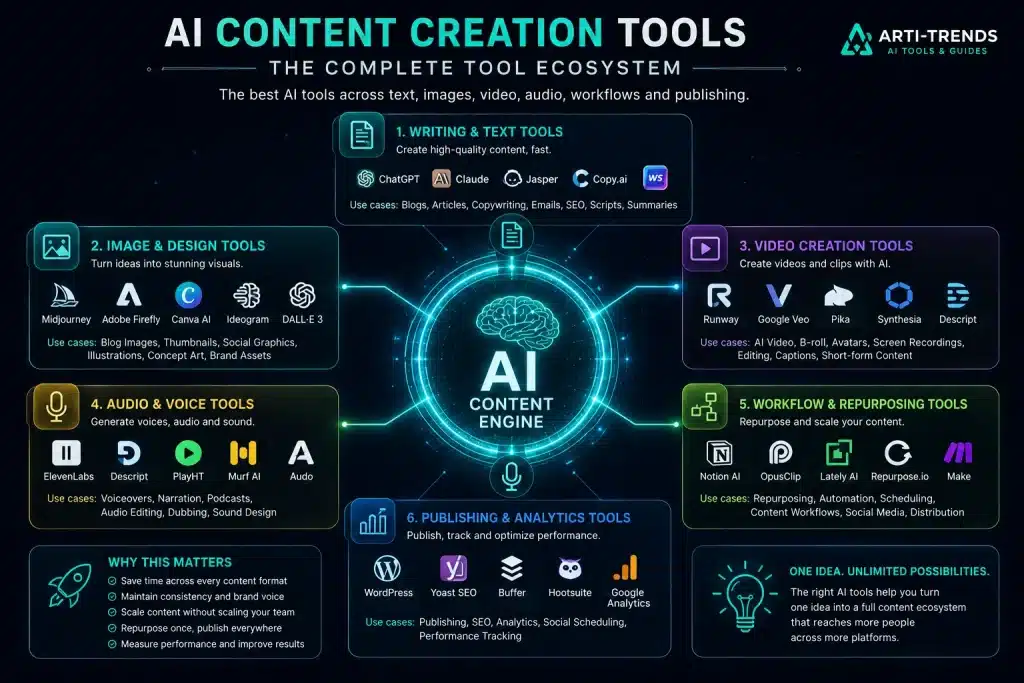
Quick Picks: Best AI Content Creation Tools by Use Case
Here is the fastest way to choose the right tool based on what you want to create.
| Use case | Best tool | Why it stands out | Watch out for |
|---|---|---|---|
| Best overall content assistant | ChatGPT | Strong all-rounder for writing, research, editing, images, files, and workflows | Still needs human editing and fact-checking |
| Best for long-form writing | Claude | Excellent for long documents, editorial refinement, summaries, and deep analysis | Less visual-first than tools built for design or video |
| Best for marketing teams | Jasper | Built around brand voice, campaign workflows, and team content operations | May be too expensive or structured for casual users |
| Best for GTM workflows | Copy.ai | Useful for sales, marketing, outreach, and repeatable business workflows | Best fit for teams with clear go-to-market processes |
| Best for premium visuals | Midjourney | Strong creative output for artistic, cinematic, and high-end visuals | Less ideal for controlled brand-safe enterprise workflows |
| Best for commercial-safe design | Adobe Firefly | Strong option for brands that care about commercially safer generative design | May feel less artistically dramatic than Midjourney |
| Best for social design | Canva AI | Great for templates, social assets, presentations, brand kits, and fast design workflows | Less specialized for advanced cinematic image generation |
| Best for text inside images | Ideogram | Strong typography and text rendering for posters, banners, and social graphics | Still requires design judgment for final polish |
| Best for AI video generation | Runway | Strong creative controls, cinematic video output, and professional video workflows | Credit usage and learning curve can matter |
| Best for cinematic video with audio | Google Veo | Useful for high-quality video generation with stronger creative control and audio capabilities | Access and availability may depend on product rollout |
| Best for social-first AI video | Pika | Good for trend-driven videos, image-to-video, and playful creative edits | Better for short creative assets than full production pipelines |
| Best for AI avatar videos | Synthesia | Strong for training, explainers, localization, and business video production | Less suited for cinematic storytelling |
| Best for AI voiceovers | ElevenLabs | High-quality AI voice generation, multilingual narration, and voice cloning options | Voice cloning requires careful ethical and legal use |
| Best for podcast and video editing | Descript | Text-based editing for audio, video, transcripts, captions, and creator workflows | Not a pure generative video model |
| Best for repurposing long videos | OpusClip | Turns long videos into short-form clips for social platforms | Works best when the source video already has strong moments |
How to Choose the Right AI Content Tool
Before choosing a tool, ask one practical question: where does your content workflow slow down?
If you struggle with blank pages, choose a writing assistant. If your articles lack visuals, choose an image or design tool. If your videos take too long to edit, choose a video editing or repurposing tool. If your brand sounds inconsistent, choose a platform with strong brand voice controls.
| Problem | Best tool category | Good starting point |
|---|---|---|
| You need better article drafts | AI writing tools | ChatGPT or Claude |
| You need consistent marketing copy | AI marketing platforms | Jasper or Copy.ai |
| You need blog visuals and thumbnails | AI image tools | Midjourney, Firefly, Canva AI, or Ideogram |
| You need short-form video content | AI video tools | Runway, Pika, Veo, or OpusClip |
| You need training or explainer videos | AI avatar tools | Synthesia |
| You need narration or voiceovers | AI voice tools | ElevenLabs |
| You need to repurpose existing content | Repurposing tools | ChatGPT, Claude, Descript, or OpusClip |
The goal is not to collect tools. The goal is to build a content system that makes your ideas easier to publish, reuse, and improve.
For a broader overview of tool categories, start with our AI Tools Ultimate Guide.
Best AI Writing and Text Creation Tools
Writing tools are the foundation of most AI content workflows. They help with ideation, research, outlines, drafts, rewrites, summaries, SEO structure, emails, scripts, captions, and content repurposing.
ChatGPT — Best Overall AI Content Assistant
ChatGPT is one of the strongest all-round AI content creation tools because it can support almost every stage of the content workflow: idea generation, research, outlining, drafting, editing, image generation, file analysis, data interpretation, and content repurposing.
- Best for: creators, bloggers, marketers, founders, students, and professionals who want one flexible AI assistant.
- Strength: versatile across writing, editing, brainstorming, images, files, and structured workflows.
- Watch out: generated drafts still need fact-checking, human editing, and brand refinement.
- Arti-Trends verdict: the best starting point for most people building an AI content workflow.
Use ChatGPT when you want a flexible content partner that can help you move from idea to article, from article to social posts, and from rough notes to structured content assets.
To get better results from tools like ChatGPT, read our AI Prompt Writing Guide.
Claude — Best for Long-Form Writing and Deep Analysis
Claude is especially strong for long-form content, deep analysis, long documents, summaries, editorial refinement, and research-heavy writing.
- Best for: long-form writers, researchers, analysts, consultants, editors, and technical content teams.
- Strength: strong long-context reasoning, clear writing, and thoughtful restructuring of complex material.
- Watch out: less useful as a complete visual or publishing workspace compared with broader creative suites.
- Arti-Trends verdict: one of the best tools for serious writing, research, and editorial work.
Use Claude when you need to turn complex source material into clear, structured, readable content.
For more research-focused workflows, explore our AI Research and Knowledge Tools.
Jasper — Best for Marketing Teams and Brand Voice
Jasper is built for marketing teams that need consistent brand voice, campaign content, templates, collaboration, and repeatable content production at scale.
- Best for: marketing teams, agencies, enterprise content teams, and brands with defined messaging.
- Strength: brand voice, campaign workflows, team collaboration, and structured marketing output.
- Watch out: may be more platform than a solo creator needs at the beginning.
- Arti-Trends verdict: strong choice when content consistency and brand control matter more than casual flexibility.
Use Jasper when your content challenge is not just “write more,” but “publish more content that sounds like the same brand every time.”
Copy.ai — Best for GTM and Business Workflows
Copy.ai is useful for teams that want AI to support go-to-market workflows, sales content, marketing copy, outreach, lead-related content, and repeatable business processes.
- Best for: sales teams, growth teams, marketing operations, and B2B content workflows.
- Strength: workflow automation and structured business content production.
- Watch out: strongest when your team already has clear processes and use cases.
- Arti-Trends verdict: best suited for business teams that want AI connected to revenue workflows, not just one-off content generation.
Best AI Image and Design Tools
Visuals are now part of almost every content workflow. Blog posts need featured images. Social posts need graphics. Videos need thumbnails. Campaigns need consistent creative assets.
The best AI image tool depends on whether you need artistic quality, commercial safety, social design, typography, or fast concept generation.
Midjourney — Best for Premium Creative Visuals
Midjourney is a strong choice for creators who want high-end, artistic, cinematic, and visually striking images.
- Best for: premium blog covers, concept art, creative campaigns, thumbnails, and visual storytelling.
- Strength: rich visual style and strong creative output.
- Watch out: less ideal when you need strict brand governance, exact layouts, or commercial-safe enterprise workflows.
- Arti-Trends verdict: one of the strongest creative tools when visual impact matters most.
Adobe Firefly — Best for Commercial-Safe Design Workflows
Adobe Firefly is a strong option for businesses, designers, and marketing teams that want generative AI inside a more brand-conscious creative workflow.
- Best for: commercial design, campaign visuals, product mockups, branded graphics, and Adobe Creative Cloud users.
- Strength: strong fit for brands that care about design control and commercially safer creative production.
- Watch out: may feel less visually dramatic than Midjourney for artistic concept work.
- Arti-Trends verdict: one of the safest choices for business-focused AI design workflows.
Canva AI — Best for Social Design and Fast Creative Assets
Canva AI is ideal for creators and small businesses that want AI-assisted design inside an easy visual editor with templates, brand assets, presentations, social graphics, and marketing materials.
- Best for: social media posts, carousels, presentations, banners, thumbnails, and quick brand assets.
- Strength: easy design workflow, templates, brand kits, and fast publishing-ready graphics.
- Watch out: less specialized for advanced cinematic image generation.
- Arti-Trends verdict: one of the best practical tools for creators who need useful visuals quickly.
Ideogram — Best for Text Inside Images
Ideogram stands out for images that need readable text, such as posters, quote graphics, banners, thumbnails, and ad creatives.
- Best for: posters, social graphics, typographic visuals, ad concepts, and text-heavy image layouts.
- Strength: better handling of typography and text placement than many generic image tools.
- Watch out: generated designs still need layout judgment and final brand polish.
- Arti-Trends verdict: a strong choice when your visual needs readable words, not just beautiful imagery.
ChatGPT Images — Best for Visual Ideation Inside a Writing Workflow
ChatGPT Images is useful when you want to create or refine visual ideas inside the same environment where you write, plan, edit, and structure content.
- Best for: blog visuals, concept images, mockups, simple branded illustrations, and visual brainstorming.
- Strength: smooth workflow between writing, visual direction, editing, and image generation.
- Watch out: still needs strong prompt direction and human review for brand accuracy.
- Arti-Trends verdict: best when you want writing and visual creation to happen in one place.
For a deeper breakdown of image platforms, explore our AI Image Tools guide.
Best AI Video Creation Tools
AI video tools are changing quickly. Some tools focus on cinematic generation, others on social videos, avatar explainers, editing, or repurposing.
For most creators, the best video workflow is not one tool. It is a combination of scriptwriting, scene generation, editing, captions, voice, and repurposing.
Editor’s note: AI video availability changes fast. Before building a workflow around any video platform, check current access, pricing, usage limits, export rules, and commercial rights.
Runway — Best for Professional AI Video Generation
Runway is one of the strongest platforms for creators who want cinematic video generation, visual control, motion quality, and a more professional creative workflow.
- Best for: filmmakers, creators, marketers, designers, and advanced video experiments.
- Strength: strong video generation, visual fidelity, creative control, and scene-based workflows.
- Watch out: advanced video generation can involve credits, iteration, and a learning curve.
- Arti-Trends verdict: one of the best options for serious AI video creation.
Google Veo — Best for Cinematic Video With Audio
Google Veo is a strong option for cinematic video generation, especially as AI video moves toward richer creative control, longer scenes, and native audio capabilities.
- Best for: cinematic concepts, video experiments, creative scenes, and multimodal storytelling.
- Strength: video generation with stronger control, consistency, creativity, and audio direction.
- Watch out: availability and workflow access may depend on Google’s product rollout and plan access.
- Arti-Trends verdict: one of the most important AI video tools to watch for creators and businesses.
Pika — Best for Social-First AI Video
Pika is useful for creators who want fast, playful, social-first AI videos, trend-based edits, image-to-video transformations, and short creative clips.
- Best for: short-form content, social media videos, creative effects, and fast visual experiments.
- Strength: easy creative video generation and editing features for social content.
- Watch out: better for short creative assets than full production-grade video systems.
- Arti-Trends verdict: a strong pick for creators who want movement, speed, and social-native video ideas.
Synthesia — Best for AI Avatar and Training Videos
Synthesia is best known for AI avatar videos. It is especially useful for businesses that need training videos, explainers, onboarding content, internal communication, and multilingual video production.
- Best for: corporate training, tutorials, explainers, onboarding videos, and localized business content.
- Strength: fast script-to-video workflows with avatars and multilingual support.
- Watch out: less suited for cinematic, emotional, or highly artistic storytelling.
- Arti-Trends verdict: one of the best business video tools when you need clear, repeatable communication at scale.
For more video-focused options, read our AI Video Tools guide.
Best AI Voice, Audio, and Editing Tools
Voice and audio tools are essential for podcasts, courses, videos, training materials, accessibility, narration, and multilingual content.
ElevenLabs — Best for AI Voiceovers and Narration
ElevenLabs is one of the strongest AI voice platforms for lifelike speech, voiceovers, narration, multilingual content, and voice cloning workflows.
- Best for: video narration, podcasts, courses, audiobooks, explainers, and multilingual voice content.
- Strength: realistic voice generation, language support, voice design, and voice cloning options.
- Watch out: voice cloning should only be used with proper consent, disclosure, and legal awareness.
- Arti-Trends verdict: one of the best voice tools for creators who want professional narration without recording every line manually.
Descript — Best for Text-Based Audio and Video Editing
Descript makes editing audio and video feel more like editing a document. It is useful for creators who work with podcasts, interviews, screen recordings, captions, video clips, and spoken content.
- Best for: podcasters, YouTubers, educators, course creators, and video-first teams.
- Strength: transcription, text-based editing, captions, screen recording, and creator-friendly workflows.
- Watch out: not a pure generative video model; it is strongest as an editing and production tool.
- Arti-Trends verdict: one of the most practical tools for turning raw recordings into polished content.
Best AI Repurposing Tools
Repurposing is where AI content tools create some of the highest leverage. A single long-form article, podcast, webinar, or YouTube video can become multiple platform-native assets.
OpusClip — Best for Turning Long Videos Into Shorts
OpusClip is built to turn long videos into short-form clips for platforms such as YouTube Shorts, TikTok, Instagram Reels, and LinkedIn.
- Best for: YouTubers, podcasters, coaches, webinar creators, and brands with long-form video content.
- Strength: clipping, reframing, captioning, and turning one video into multiple short-form assets.
- Watch out: AI clipping works best when the original video already contains strong hooks and clear moments.
- Arti-Trends verdict: one of the fastest ways to multiply the reach of long-form video content.
ChatGPT and Claude — Best for Text Repurposing
ChatGPT and Claude are excellent for repurposing written content. They can turn one long article into social posts, email summaries, video scripts, FAQs, newsletter copy, comparison tables, and content briefs.
- Best for: bloggers, newsletter writers, SEO teams, educators, and creators with existing long-form content.
- Strength: restructuring content for different audiences, formats, tones, and platforms.
- Watch out: platform-native writing still needs human judgment; a LinkedIn post should not read like a blog summary.
- Arti-Trends verdict: the easiest way to turn one good idea into a complete content ecosystem.
For a deeper approach to repeatable systems, read our AI Workflows Guide.
Which AI Content Tool Should You Start With?
The right starting stack depends on who you are and what you create.
| User type | Recommended starter stack | Why this works |
|---|---|---|
| Solo creator | ChatGPT + Canva AI + Descript | Covers writing, design, editing, and basic publishing workflows |
| Blogger or SEO writer | ChatGPT or Claude + Canva AI + Ideogram | Strong for articles, outlines, metadata, visuals, and social repurposing |
| Marketing team | Jasper + Adobe Firefly + Canva AI + Descript | Better for brand consistency, campaign assets, and team workflows |
| YouTuber or video creator | ChatGPT or Claude + Runway or Pika + Descript + OpusClip | Covers scripts, AI video, editing, captions, and short-form repurposing |
| Course creator | ChatGPT + Synthesia + ElevenLabs + Descript | Useful for scripts, avatar videos, narration, editing, and training content |
| Agency | Jasper + ChatGPT + Firefly + Runway + OpusClip | Supports copy, brand voice, visuals, video, and multi-channel delivery |
Beginners should start with one or two tools and master the workflow before adding more. Advanced creators can build a broader stack, but only when each tool has a clear job.
A simple AI stack that you actually use is better than a complex stack that creates more friction.
In Short: The Best AI Content Tools Depend on Your Workflow
The best AI content creation tools in 2026 are not just content generators. They are workflow engines.
ChatGPT and Claude are strong for writing, research, editing, and repurposing. Jasper and Copy.ai are better for marketing teams and business workflows. Midjourney, Adobe Firefly, Canva AI, Ideogram, and ChatGPT Images cover different visual needs. Runway, Veo, Pika, Synthesia, ElevenLabs, Descript, and OpusClip support the growing demand for video, voice, editing, and short-form content.
The real advantage comes from combining the right tools into a repeatable system: one idea becomes an article, a visual, a video, a voiceover, a newsletter, and a set of social assets.
That is the new content workflow. Not more tools for the sake of more tools, but better creative infrastructure around your best ideas.
Next, we’ll look at how AI improves the entire content workflow, from research and outlining to editing, visuals, video, repurposing, and publishing.
How AI Improves the Content Workflow
AI content creation tools do not only help you create individual pieces of content faster. Their biggest impact is that they improve the entire content workflow.
They help you move from research to strategy, from outline to draft, from draft to final asset, and from one finished piece of content to multiple platform-specific formats.
That is the real shift. AI turns content creation from a slow sequence of manual tasks into a repeatable creative pipeline.
A strong AI workflow does not remove human judgment. It removes unnecessary friction.
The best creators and teams do not use AI as a button that “makes content.” They use it as a workflow layer that supports thinking, structure, editing, visual direction, repurposing, and distribution.
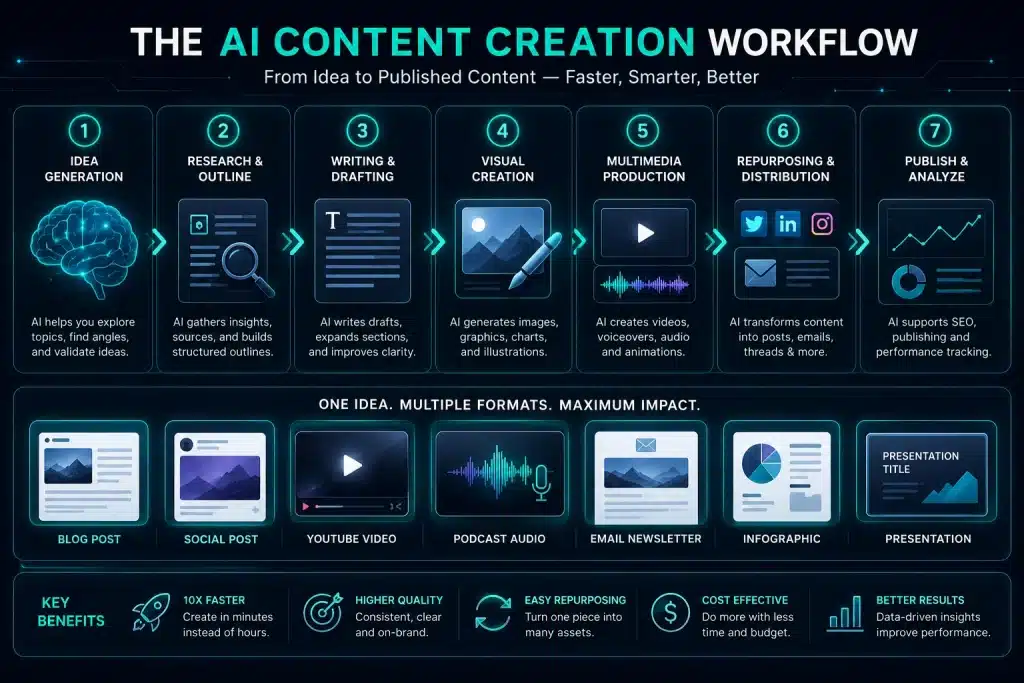
The AI Content Workflow at a Glance
A modern AI-assisted content workflow usually moves through eight stages.
| Workflow stage | What AI helps with | What humans still decide |
|---|---|---|
| Research | Summaries, source comparison, topic gaps, key points | Which sources are trustworthy and relevant |
| Strategy | Angles, audience pain points, search intent, positioning | The core point of view and editorial direction |
| Outlining | Structure, sections, flow, missing context | What deserves emphasis and what should be removed |
| Drafting | First versions, sections, examples, transitions | Original insights, nuance, and final argument |
| Editing | Clarity, tone, rhythm, grammar, formatting | Brand taste, voice, and trustworthiness |
| Visual creation | Image briefs, thumbnails, graphics, visual concepts | Creative direction and brand consistency |
| Video and audio | Scripts, voiceovers, clips, captions, scenes | Storytelling, pacing, and final production quality |
| Repurposing and publishing | Social posts, metadata, emails, summaries, distribution copy | Channel strategy and publishing judgment |
This workflow is powerful because each stage improves the next. Better research creates better outlines. Better outlines create better drafts. Better drafts create better visuals, videos, and repurposed content.
Research: From Scattered Information to Usable Insight
Every strong piece of content starts with clarity. Before you write, record, design, or publish, you need to understand the topic, the audience, the angle, and the information gap.
AI can speed up this early research phase by helping you summarize long sources, compare different viewpoints, extract key arguments, identify repeated themes, and turn messy notes into usable insights.
- Summarize articles, PDFs, reports, transcripts, and research notes.
- Compare multiple sources and highlight agreements or contradictions.
- Extract key ideas, statistics, examples, and definitions.
- Find missing questions that competitors have not answered clearly.
- Turn raw research into a practical content brief.
This does not mean you should trust every AI summary blindly. Research-heavy content still needs source checking, editorial judgment, and careful verification — especially in areas like finance, health, law, technology, and fast-moving AI news.
For deeper research workflows, explore our AI Research and Knowledge Tools guide.
Strategy: Choosing the Right Angle Before You Create
One of the most overlooked parts of content creation is strategy. Many creators move straight from idea to draft. AI makes that tempting because it can generate text so quickly.
But speed without strategy usually creates generic content.
AI is more useful when you use it to sharpen the angle before the writing starts. It can help you explore audience needs, search intent, objections, content formats, emotional hooks, and possible positioning.
- Who is this content for?
- What does the reader already know?
- What problem are they trying to solve?
- What would make this article more useful than competing pages?
- What is the strongest point of view?
- Which format fits best: guide, tutorial, comparison, checklist, review, or explainer?
This is where human direction matters most. AI can generate angles. You decide which angle is worth publishing.
AI can help you find options. Strategy is choosing the option that deserves attention.
Outlining: Turning Chaos Into Clear Structure
AI is especially useful for outlining because it can turn scattered ideas into a logical structure. This is where a vague topic becomes a usable blueprint.
A good outline prevents rambling. It also helps you see whether the content has enough depth, whether the sections are in the right order, and whether the reader’s main questions are being answered.
- Turn rough notes into a clear article structure.
- Break a broad topic into logical sections and subsections.
- Create outlines for blog posts, scripts, guides, emails, and presentations.
- Identify missing context before drafting.
- Improve flow, readability, and search intent coverage.
A useful outlining framework is:
Reader problem → Search intent → Core promise → Main sections → Examples → Takeaways → CTA
Clear outlining is one of the foundations of a strong AI workflow, because it turns creativity into a repeatable process instead of a blank-page struggle.
Drafting: From Blank Page to Editable First Version
Drafting is where most people first notice the power of AI. Instead of staring at a blank page, you can generate a rough first version and start editing immediately.
This changes the creative process. The first step is no longer “write perfectly.” The first step becomes “create something useful enough to improve.”
- Create first drafts of article sections, intros, summaries, and explanations.
- Generate headline variations and section transitions.
- Turn bullet points into readable paragraphs.
- Rewrite technical ideas for beginners or business audiences.
- Create calls to action, newsletter summaries, and social captions.
The key is not to publish the first AI draft. The key is to use the first draft as raw material.
AI gives you momentum. Human editing gives the content quality, originality, and trust.
Editing: Improving Clarity, Voice, and Trust
Editing is where AI can quietly save the most time. A strong AI writing assistant can help tighten language, improve flow, remove repetition, simplify complex sentences, and adapt the tone for a specific audience.
For content creators and businesses, this is especially valuable because the gap between a rough draft and a publishable asset is often bigger than expected.
- Rewrite paragraphs for clarity and readability.
- Remove repetition, weak phrasing, and unnecessary filler.
- Improve tone, structure, rhythm, and transitions.
- Adapt content for beginners, experts, executives, or casual readers.
- Apply brand voice and formatting rules across multiple assets.
Editing is also where you should add the most human value: examples, experience, opinions, expert context, real-world nuance, and fact-checking.
For better control over tone, formatting, and final output, read our AI Prompt Writing Guide.
Visual Creation: Turning Ideas Into Branded Assets
Modern content needs visuals. Blog posts need featured images. Tutorials need screenshots or diagrams. Social posts need graphics. Videos need thumbnails. Product pages need supporting creative assets.
AI image and design tools help creators move from written concept to visual direction much faster. But the best results come when you treat visuals as part of the workflow, not as decoration at the end.
- Create blog illustrations, thumbnails, diagrams, and concept visuals.
- Generate visual ideas for campaigns and social posts.
- Turn article sections into infographic concepts.
- Create consistent image prompts based on brand style.
- Prepare alt text, image titles, captions, and descriptions for SEO.
A simple visual brief can make a major difference.
| Visual brief element | Example |
|---|---|
| Purpose | Explain the content workflow visually |
| Format | Square blog cover, infographic, thumbnail, or social post |
| Style | Premium tech aesthetic, clean layout, high contrast |
| Brand elements | Turquoise accents, consistent typography, recognizable design system |
| Main idea | One idea moving through research, writing, visuals, video, and publishing |
| SEO metadata | Filename, alt text, title, caption, and description |
For a deeper breakdown of visual tools, explore our AI Image Tools guide.
Video and Audio: Expanding Content Beyond Text
AI also improves the video and audio side of content production. A written idea can become a script, a voiceover, a short-form video, an explainer, an avatar video, or a podcast outline.
This matters because audiences do not consume content in one format. Some people read. Some watch. Some listen. A strong AI workflow helps you serve multiple content habits without starting from zero every time.
- Turn article sections into video scripts.
- Create podcast outlines from long-form content.
- Generate voiceover scripts and narration drafts.
- Extract short-form clips from longer videos.
- Create captions, summaries, and platform-specific video descriptions.
- Use avatar videos for training, explainers, and internal communication.
Video and audio tools are strongest when they are connected to the rest of your content system. The article becomes the script. The script becomes the video. The video becomes clips. The clips become social posts. The social posts bring people back to the original guide.
For more options, read our AI Video Tools guide.
Repurposing: Turning One Strong Idea Into Many Assets
Repurposing is one of the highest-leverage uses of AI content creation tools. Instead of creating separate content for every platform, you can build one strong core asset and adapt it into multiple formats.
This is how a single article can become a full content campaign.
| Core asset | AI can repurpose it into | Best channel |
|---|---|---|
| Long-form article | LinkedIn post, X thread, newsletter, carousel, short video script | Search, social, email |
| YouTube video | Blog post, clips, show notes, quote graphics, email summary | YouTube, blog, social |
| Podcast episode | Article, transcript, social snippets, newsletter, short clips | Podcast, blog, LinkedIn |
| Webinar | Guide, checklist, email sequence, training clips, FAQ section | Lead generation, sales, education |
| Product page | Ads, comparison copy, FAQs, email campaign, social posts | Marketing and conversion |
The best repurposing workflows do not copy and paste the same message everywhere. They adapt the idea to the platform.
- A blog post should be structured and searchable.
- A LinkedIn post should feel sharp, useful, and human.
- An X thread should move quickly from point to point.
- A newsletter should feel direct and personal.
- A short video should open with a strong hook.
For creator-focused workflows, explore our AI Tools for Creators guide.
Publishing: Metadata, SEO, and Distribution
The final stage of the workflow is publishing. This is where AI can help prepare content for search engines, social platforms, email inboxes, and internal distribution.
AI can support the publishing process by generating SEO titles, meta descriptions, summaries, alt text, captions, social posts, email previews, pull quotes, and internal link suggestions.
- Generate SEO title variations around the focus keyphrase.
- Create meta descriptions that match search intent.
- Write alt text, image titles, captions, and descriptions.
- Suggest internal links to related guides and tool pages.
- Create social copy for LinkedIn, X, Facebook, Instagram, and Pinterest.
- Prepare newsletter summaries and teaser copy.
This step matters because good content can still underperform if it is published poorly. Metadata, internal links, visuals, summaries, and distribution copy help your content travel further.
AI can help you prepare the package. Human judgment still decides whether the package is accurate, useful, and worth publishing.
The AI Content Workflow Flywheel
The best AI content workflows become stronger over time. Every article, visual, video, and social post creates new inputs for the next round of content.
A simple flywheel looks like this:
Research → Angle → Outline → Draft → Edit → Visuals → Repurpose → Publish → Learn → Improve
Once this system is in place, content creation becomes less random. You are no longer producing isolated assets. You are building a repeatable engine around your best ideas.
This is also where AI becomes more valuable for businesses. A team can use the same workflow to produce blog content, campaign assets, sales enablement material, training content, product updates, and executive communication.
In Short: AI Strengthens Every Phase of Content Creation
AI improves the content workflow by reducing friction at every stage: research, strategy, outlining, drafting, editing, visuals, video, repurposing, and publishing.
But the strongest results still come from human-led workflows. AI provides speed, structure, and scale. Humans provide judgment, originality, accuracy, and taste.
That combination is what turns AI from a simple content generator into a real creative operating system.
Next, we’ll build the ultimate AI content creation stack: the practical combination of writing, visual, video, repurposing, and distribution tools you need in 2026.
The AI Content Creation Stack: The Ultimate Setup
Creating high-quality content consistently requires more than one AI tool. A single writing assistant can help you draft faster, but a complete content operation needs a full AI content creation stack.
That stack should cover the full journey: research, writing, visuals, video, audio, repurposing, publishing, and distribution.
The goal is not to collect as many tools as possible. That usually creates more friction, not less. The goal is to build a simple, modular system where every tool has a clear job.
A strong AI content stack does not feel like a toolbox. It feels like an operating system for your ideas.
In 2026, the best content stacks are built around five core engines: writing, visuals, video and audio, repurposing, and publishing.
The 5 Core Layers of an AI Content Stack
Every creator, marketer, founder, agency, or business can start with this basic structure.
| Stack layer | Purpose | Example tools |
|---|---|---|
| Writing engine | Ideas, research, outlines, drafts, editing, SEO, scripts | ChatGPT, Claude, Jasper, Copy.ai |
| Visual engine | Blog visuals, thumbnails, graphics, brand assets, image concepts | Midjourney, Adobe Firefly, Canva AI, Ideogram, ChatGPT Images |
| Video and audio engine | Scripts, clips, avatar videos, narration, podcasts, voiceovers | Runway, Pika, Google Veo, Synthesia, ElevenLabs, Descript |
| Repurposing engine | Turning one asset into many platform-native formats | ChatGPT, Claude, Descript, OpusClip |
| Publishing and distribution engine | Metadata, scheduling, social posts, newsletters, publishing workflows | WordPress, Notion, Buffer, Hootsuite, Later, Canva |
This structure keeps your workflow simple. Instead of asking, “Which AI tool should I use?”, you ask: “Which part of my content workflow needs support?”
1. Writing Engine: The Core of Your Content Workflow
Your writing engine is the heart of your AI content stack. It helps you think, structure, draft, edit, rewrite, summarize, and repurpose written content.
This is usually the first tool you should choose, because most content workflows begin with text: ideas, notes, research, outlines, scripts, headlines, briefs, captions, emails, and article drafts.
Recommended tools
- ChatGPT: best overall writing and workflow assistant for most creators and businesses.
- Claude: strong for long-form writing, document analysis, summaries, and editorial refinement.
- Jasper: useful for marketing teams that need brand voice, campaigns, and repeatable content production.
- Copy.ai: useful for sales, marketing, outreach, and go-to-market workflows.
What your writing engine handles
- topic ideas and content angles
- research summaries and source comparison
- content briefs and article outlines
- first drafts, rewrites, and section improvements
- SEO titles, meta descriptions, FAQs, and internal link suggestions
- social posts, email summaries, video scripts, and newsletter copy
A good writing engine should not replace your voice. It should help you shape your ideas faster, test more angles, and improve clarity before publishing.
For better results, combine your writing engine with clear prompt instructions. Start with our AI Prompt Writing Guide.
2. Visual Engine: Images, Graphics, Thumbnails, and Brand Assets
Your visual engine creates the images and graphics that support your content. This includes blog covers, social visuals, thumbnails, infographics, ad creatives, product mockups, and campaign assets.
Visuals are not decoration. They shape how people understand, remember, and click on your content. A strong visual engine helps turn your written ideas into recognizable creative assets.
Recommended tools
- Midjourney: best for premium, artistic, cinematic, and high-impact visuals.
- Adobe Firefly: strong for brand-conscious and commercially safer design workflows.
- Canva AI: practical for social graphics, templates, presentations, thumbnails, and brand assets.
- Ideogram: strong for posters, banners, quote graphics, and visuals with readable text.
- ChatGPT Images: useful for creating visual ideas inside a broader writing and planning workflow.
What your visual engine handles
- featured images for blog posts
- social media graphics and carousel concepts
- thumbnail ideas for YouTube, articles, and newsletters
- infographic briefs and visual explanations
- ad concepts and campaign visuals
- image SEO metadata, including filenames, alt text, titles, captions, and descriptions
The best workflow is to create the visual brief before generating the image. Define the purpose, format, audience, style, brand elements, and key message first.
For more options, explore our AI Image Tools guide.
3. Video and Audio Engine: Scripts, Clips, Voiceovers, and Explainers
Your video and audio engine helps you expand written content into formats people can watch and listen to.
This matters because modern audiences do not consume content in one way. Some people read long-form guides. Others prefer short videos, podcasts, explainers, tutorials, webinars, or voice-led learning.
Recommended tools
- Runway: strong for professional AI video generation and creative video workflows.
- Google Veo: useful for cinematic AI video generation and multimodal storytelling workflows.
- Pika: strong for short-form, social-first, creative video experiments.
- Synthesia: useful for AI avatar videos, training content, explainers, and business communication.
- ElevenLabs: strong for AI voiceovers, narration, multilingual audio, and voice content.
- Descript: practical for editing podcasts, videos, transcripts, captions, and creator content.
What your video and audio engine handles
- turning articles into video scripts
- creating short-form video ideas from long-form content
- generating voiceover scripts and narration drafts
- creating AI avatar explainers and training videos
- editing transcripts, podcasts, tutorials, and screen recordings
- creating captions, summaries, and video descriptions
The strongest video and audio workflows start with a good written asset. A guide becomes a script. A script becomes a video. The video becomes clips. The clips become social posts. The social posts drive people back to the original content.
For a deeper breakdown, read our AI Video Tools guide.
4. Repurposing Engine: Turning One Idea Into Many Assets
Your repurposing engine is where the real leverage appears. Instead of creating separate content for every platform, you start with one strong core asset and transform it into multiple platform-native formats.
This is the difference between publishing content and building a content ecosystem.
Recommended tools
- ChatGPT: strong for turning articles into social posts, newsletters, FAQs, scripts, and summaries.
- Claude: strong for restructuring long documents and repurposing complex material.
- Descript: useful for repurposing audio and video content through transcripts and clips.
- OpusClip: useful for turning long videos into short-form clips for social platforms.
What your repurposing engine handles
- one article into LinkedIn posts, X threads, emails, and short scripts
- one YouTube video into blog posts, clips, show notes, and newsletters
- one podcast into quote graphics, summaries, articles, and short clips
- one webinar into a guide, checklist, email sequence, and social campaign
- one product page into ads, FAQs, comparison copy, and email campaigns
The key is to adapt the message to each platform. A LinkedIn post should not read like an article summary. A short video should not feel like a paragraph spoken out loud. Repurposing works best when AI helps you preserve the idea while reshaping the format.
For more practical creator workflows, explore our AI Tools for Creators guide.
5. Publishing and Distribution Engine: Getting Content Seen
Your publishing and distribution engine makes sure your content is prepared, optimized, scheduled, and shared across the right channels.
This layer is often underestimated. Good content can still underperform if the title is weak, the metadata is missing, the visual is unclear, the internal links are poor, or the content is never repurposed after publishing.
Recommended tools
- WordPress: for publishing, SEO structure, internal links, categories, tags, and content hubs.
- Notion: for content planning, editorial calendars, briefs, and knowledge management.
- Buffer: for scheduling social content across platforms.
- Hootsuite: for broader social media management and team workflows.
- Later: for visual-first social planning and scheduling.
- Canva: for preparing social assets, templates, and visual publishing material.
What your publishing engine handles
- SEO titles and meta descriptions
- slug structure, categories, tags, and internal links
- image metadata, alt text, captions, and descriptions
- social media captions and platform-specific posts
- newsletter summaries and teaser copy
- publishing calendars and content distribution workflows
This layer turns your content from a finished asset into a distributed asset. That distinction matters. Content only creates value when people can find it, understand it, and act on it.
For more workflow examples, read our AI Workflows Guide.
Starter Stack: Best Setup for Beginners and Solo Creators
If you are just starting, keep the stack simple. You do not need ten tools. You need a few tools that cover the most important parts of the workflow.
| Stack layer | Recommended tool | Why this works |
|---|---|---|
| Writing | ChatGPT | Covers ideation, drafting, editing, SEO, and repurposing |
| Visuals | Canva AI | Easy for blog graphics, social posts, thumbnails, and templates |
| Repurposing | ChatGPT | Turns articles into social posts, emails, scripts, and summaries |
| Publishing | WordPress | Best base for blogs, SEO structure, categories, tags, and internal links |
| Planning | Notion | Useful for calendars, briefs, notes, and content ideas |
This beginner stack is enough to create articles, visuals, social posts, newsletters, and basic content campaigns without creating workflow chaos.
Pro Stack: Best Setup for Serious Creators and Marketers
A pro stack adds stronger tools for visuals, video, audio, and repurposing. This is useful when content becomes part of your growth strategy, not just your publishing habit.
| Stack layer | Recommended tools | Best use case |
|---|---|---|
| Writing | ChatGPT + Claude | Flexible writing plus long-form analysis and refinement |
| Visuals | Midjourney + Canva AI + Ideogram | Premium covers, social assets, and text-based graphics |
| Video | Runway or Pika | Short-form video, visual experiments, and creative clips |
| Audio | ElevenLabs + Descript | Voiceovers, narration, podcasts, transcripts, and editing |
| Repurposing | OpusClip + ChatGPT | Video clipping plus text-based content expansion |
| Distribution | WordPress + Buffer + Notion | Publishing, scheduling, planning, and workflow control |
This setup works well for bloggers, YouTubers, newsletter writers, educators, consultants, and creators who want to turn one core idea into multiple formats.
Agency Stack: Best Setup for Teams and Content Operations
Teams and agencies need more than creative output. They need consistency, collaboration, brand control, approval workflows, and repeatable systems.
| Stack layer | Recommended tools | Why teams use it |
|---|---|---|
| Writing and brand voice | Jasper + ChatGPT + Claude | Brand voice, campaign content, long-form work, and flexible editing |
| Design | Adobe Firefly + Canva AI + Midjourney | Brand-safe design, templates, and high-end creative assets |
| Video and training | Runway + Synthesia + Descript | Creative video, avatar explainers, training content, and editing |
| Voice and audio | ElevenLabs + Descript | Narration, localization, podcasts, and audio production |
| Repurposing | OpusClip + ChatGPT + Claude | Turning long-form content into platform-specific campaigns |
| Planning and distribution | Notion + WordPress + Hootsuite or Buffer | Content calendars, publishing workflows, and multi-channel distribution |
This stack is best for teams that publish at scale and need a reliable system for briefs, production, review, approval, optimization, and distribution.
How to Build Your Own AI Content Stack
The best way to build your stack is to start with your bottleneck. Do not add a tool because it is popular. Add it because it solves a clear workflow problem.
- Map your workflow: list how content moves from idea to publish.
- Find the bottleneck: identify where you lose the most time or quality.
- Choose one tool per layer: start with writing, visuals, repurposing, and publishing.
- Create reusable templates: build prompts, briefs, checklists, and formatting rules.
- Measure output quality: track whether the stack improves speed, clarity, consistency, and reach.
- Remove tools that create friction: a stack should simplify the workflow, not complicate it.
A useful rule: if a tool does not clearly improve speed, quality, consistency, creativity, or distribution, it probably does not belong in your stack yet.
The best AI stack is not the biggest stack. It is the stack you can use every week without slowing down.
Example Workflow: From One Article to a Full Content Campaign
Here is how the five-layer stack works in practice.
| Step | Stack layer | Output |
|---|---|---|
| 1. Research and outline | Writing engine | Content brief, search intent, structure, angle |
| 2. Draft and edit | Writing engine | Long-form article, intro, sections, FAQ, CTA |
| 3. Create visuals | Visual engine | Featured image, infographic idea, social graphics |
| 4. Create video/audio | Video and audio engine | Short video script, voiceover, clips, captions |
| 5. Repurpose | Repurposing engine | LinkedIn post, X thread, newsletter, carousel, video script |
| 6. Publish and distribute | Publishing engine | SEO metadata, internal links, social captions, schedule |
This is the practical power of an AI content creation stack. One article does not stay one article. It becomes a campaign.
Common Mistake: Tool Fragmentation
The biggest mistake is using too many tools too early. A messy AI stack creates the exact problem AI is supposed to solve: more friction.
Tool fragmentation usually looks like this:
- five writing tools with no clear difference between them
- three image tools but no consistent visual style
- multiple planning tools with scattered notes and calendars
- repurposed content that does not match the platform
- publishing workflows without quality control or final review
The solution is to keep your stack modular. Each tool should have one clear role, one place in the workflow, and one reason to stay.
In Short: Your AI Content Stack Is Your Creative Infrastructure
A complete AI content creation stack gives you five systems: a writing engine, a visual engine, a video and audio engine, a repurposing engine, and a publishing and distribution engine.
Together, these systems help you move from idea to article, from article to visual, from visual to video, from video to social content, and from social content to a repeatable publishing workflow.
That is the real value of AI content tools. They do not just help you create more assets. They help you build a stronger system around your ideas.
Next, we’ll look at practical AI content creation use cases, including prompts and mini-frameworks you can copy, adapt, and use immediately.
Practical Use Cases for AI Content Creation Tools
AI content creation tools become most valuable when you stop treating them like random generators and start using them inside real workflows.
The best use cases are not about asking AI to “write something.” They are about giving AI a clear role in a repeatable system: research, structure, draft, edit, design, repurpose, and publish.
Below are practical AI content creation use cases you can apply immediately. Each one includes a simple framework, a copy-ready prompt, and a clear workflow so you can move from idea to usable output faster.
The best AI prompts do not replace strategy. They package strategy into instructions.
Use Case Overview
Here is the quick overview before we break each workflow down.
| Use case | Best for | Mini framework |
|---|---|---|
| Blog posts and long-form articles | SEO content, guides, tutorials, thought leadership | Topic → Search Intent → Outline → Draft → Edit → SEO → CTA |
| Social media content | LinkedIn, X, Instagram, TikTok scripts, carousels | 1 Idea → 10 Angles → 5 Formats → 3 Tones |
| Video, podcast, and presentation scripts | YouTube, Reels, courses, webinars, explainers | Hook → Setup → Value → Story → Examples → CTA |
| Ads and marketing copy | Paid ads, landing pages, campaign copy, CTAs | Problem → Desire → Benefit → Proof → CTA |
| Product descriptions | E-commerce, SaaS pages, tool reviews, affiliate pages | Features → Benefits → Use Cases → Proof → CTA |
| Email and outreach sequences | Newsletters, sales, partnerships, follow-ups | Hook → Value → Proof → CTA → PS |
| Repurposing workflows | Turning one asset into many platform-native assets | 1 Core Asset → 10 Distribution Assets |
For a broader foundation, start with our AI Workflows Guide, where we explain how to turn AI tools into repeatable production systems.
1. Blog Posts and Long-Form Articles
Long-form content is one of the strongest use cases for AI. A good AI writing tool can help you move from a rough topic to a structured article outline, then from outline to draft, and finally from draft to edited, SEO-ready content.
The key is to use AI in stages. Do not ask for a complete article in one step and publish the result. Use AI to build the structure first, then improve each section with human judgment, examples, internal links, and fact-checking.
Mini Framework: Long-Form Content Engine
Topic → Search Intent → Outline → Draft → Edit → SEO → CTA
Workflow
- Define the topic: choose the main keyword, audience, and content goal.
- Analyze search intent: decide whether the reader wants a guide, tutorial, comparison, checklist, or review.
- Create the outline: build H2 and H3 sections around reader questions.
- Draft section by section: generate one section at a time instead of one huge article.
- Edit for originality: add examples, opinions, experience, expert context, and internal links.
- Optimize for SEO: improve headings, metadata, FAQs, image alt text, and structure.
- Add a CTA: guide the reader to the next useful action.
Copy-Ready Prompt
Act as an expert content strategist. Create a complete SEO outline for an article about [TOPIC]. Target the keyword [KEYWORD]. The audience is [AUDIENCE]. Include search intent, H2 sections, H3 subsections, reader questions, examples to include, internal link opportunities, and a strong CTA. Do not write the article yet. Build the structure first.
Best Tools for This Use Case
- ChatGPT: best all-round option for ideation, outlining, drafting, editing, and SEO support.
- Claude: strong for long-form writing, restructuring complex drafts, and working with large documents.
- Jasper: useful for marketing teams that need brand voice and repeatable campaign content.
For stronger prompts, use our AI Prompt Writing Guide alongside this workflow.
2. Social Media Content: Posts, Threads, Captions, and Carousels
Social media is where AI can turn one idea into dozens of platform-ready variations. The mistake is using the same post everywhere. A LinkedIn post, X thread, Instagram caption, TikTok script, and carousel should not sound identical.
AI helps you keep the core idea while adapting the format, tone, hook, and structure for each platform.
Mini Framework: Content Multiplying
1 Idea → 10 Angles → 5 Formats → 3 Tones
Workflow
- Start with one core idea: use an article section, product insight, trend, lesson, or opinion.
- Generate angles: turn the idea into educational, contrarian, practical, personal, and story-driven versions.
- Adapt the format: create LinkedIn posts, X threads, carousel slides, short video scripts, and captions.
- Vary the tone: test clear, punchy, inspirational, analytical, and conversational versions.
- Edit for the platform: shorten, sharpen, and make the opening line stronger.
Copy-Ready Prompt
Turn this idea into 10 platform-ready social posts for LinkedIn, X, Instagram, and TikTok. Create different angles: educational, practical, contrarian, storytelling, and inspirational. For each post, include a strong hook, the main point, and a clear CTA. Keep each version native to the platform.
Best Tools for This Use Case
- ChatGPT: strong for fast variation, tone control, hooks, and platform adaptation.
- Claude: strong for turning long-form ideas into thoughtful social content.
- Canva AI: useful for turning social ideas into carousels, graphics, and templates.
- OpusClip: useful when the source asset is a long video.
For more creator-focused workflows, explore our AI Tools for Creators guide.
3. Scripts for Video, Podcasts, Courses, and Presentations
AI is especially useful for spoken formats because it can turn rough ideas into a clear sequence. A strong script needs more than information. It needs flow, rhythm, examples, transitions, and a reason to keep watching or listening.
This use case works for YouTube videos, short-form videos, podcast intros, webinar scripts, course lessons, avatar videos, product explainers, and internal training content.
Mini Framework: Script Builder
Hook → Setup → Value → Story → Examples → Summary → CTA
Workflow
- Open with a hook: name the problem, promise, or surprising insight.
- Set up the context: explain why the topic matters now.
- Deliver the value: structure the main points clearly.
- Add examples: make the script concrete and easier to follow.
- Close with a summary: repeat the main takeaway.
- Add a CTA: tell the viewer or listener what to do next.
Copy-Ready Prompt
Turn this outline into a clear video script using Hook → Setup → Value → Story → Examples → Summary → CTA. Keep the tone conversational, useful, and easy to follow. Add short transitions between sections and include a strong opening line that makes people want to keep watching.
Best Tools for This Use Case
- ChatGPT or Claude: best for script structure, voice, and editing.
- Synthesia: useful for turning scripts into AI avatar videos.
- ElevenLabs: useful for narration, voiceovers, and multilingual audio.
- Descript: useful for editing recordings, transcripts, captions, and spoken content.
For video-specific platforms, read our AI Video Tools guide.
4. Ads and Marketing Copy
AI can generate ads quickly, but good ad copy still needs strategy. The goal is not just to write something catchy. The goal is to connect a real problem to a clear benefit and make the next step obvious.
This use case works for paid ads, landing page headlines, product campaigns, email subject lines, social ads, newsletter sponsorship copy, and affiliate callouts.
Mini Framework: High-Conversion Copy
Problem → Desire → Benefit → Proof → CTA
Workflow
- Define the audience: who is this copy for?
- Name the problem: what pain or friction do they feel?
- Show the desired outcome: what do they want instead?
- Connect the benefit: how does the product, tool, or offer help?
- Add proof: use features, outcomes, reviews, examples, or credibility signals.
- End with action: make the next step clear and low-friction.
Copy-Ready Prompt
Write 5 ad variations for [PRODUCT/OFFER] using Problem → Desire → Benefit → Proof → CTA. The target audience is [AUDIENCE]. Keep each version short, specific, and scroll-stopping. Avoid hype. Focus on clear value, emotional relevance, and a strong call to action.
Best Tools for This Use Case
- Jasper: strong for brand voice, campaign copy, and marketing team workflows.
- Copy.ai: useful for sales, outreach, and go-to-market copy workflows.
- ChatGPT: strong for fast ad angles, variations, rewrites, and CTA testing.
For broader business use cases, explore our AI Tools for Business guide.
5. Product Descriptions and E-commerce Content
AI can help turn product information into clear, persuasive copy. This is useful for e-commerce pages, SaaS landing pages, tool reviews, affiliate pages, comparison pages, and product launch content.
The strongest product copy does not just list features. It translates features into outcomes. It explains who the product is for, why it matters, and what problem it solves.
Mini Framework: Product Copy
Features → Benefits → Use Cases → Proof → CTA
Workflow
- List the features: what does the product actually do?
- Translate features into benefits: why should the buyer care?
- Add use cases: show practical situations where the product helps.
- Include proof: add reviews, ratings, data, examples, or credibility markers where available.
- Clarify fit: explain who should use it and who should not.
- Close with a CTA: guide the reader to compare, try, buy, or learn more.
Copy-Ready Prompt
Create a product description for [PRODUCT] using Features → Benefits → Use Cases → Proof → CTA. Write for [AUDIENCE]. Make the copy clear, persuasive, and specific. Include a short “best for” line, three key benefits, one limitation, and a concise CTA.
Best Tools for This Use Case
- ChatGPT: strong for product descriptions, comparison tables, FAQs, and affiliate copy drafts.
- Claude: strong for rewriting product pages into clearer, more trustworthy copy.
- Copy.ai: useful for structured sales and product messaging workflows.
This is especially useful when combined with comparison pages, review content, and tool directories inside your AI Tools Hub.
6. Emails, Outreach, and Newsletter Sequences
Email is one of the most practical AI content use cases because the structure is repeatable. AI can help with newsletters, cold outreach, follow-ups, partnership emails, onboarding sequences, re-engagement campaigns, and product updates.
The goal is not to make emails longer. Usually, it is the opposite. AI works best when you use it to make emails clearer, more specific, and easier to respond to.
Mini Framework: Email Builder
Hook → Value → Proof → CTA → PS
Workflow
- Start with the purpose: newsletter, outreach, follow-up, sales, partnership, or retention.
- Define the reader: who receives the email and what do they care about?
- Open with relevance: make the first line specific, not generic.
- Deliver value quickly: explain what is useful, new, or important.
- Add proof or context: support the message with a reason to trust it.
- End with one CTA: ask for one clear action.
Copy-Ready Prompt
Rewrite this email using Hook → Value → Proof → CTA → PS. Keep the tone friendly, concise, and specific. Remove filler. Make the first line more relevant to the recipient. End with one clear next step.
Best Tools for This Use Case
- ChatGPT: strong for newsletter drafts, outreach rewrites, and subject line testing.
- Claude: strong for making emails sound more natural, thoughtful, and less generic.
- Copy.ai: useful for sales and outbound workflows.
- Jasper: useful for brand-controlled email campaigns.
Email workflows become stronger when connected to your broader content system. One article can become a newsletter, one newsletter can become a social post, and one social post can bring readers back to the original guide.
7. Repurposing: Turn One Piece of Content Into Ten
Repurposing is one of the highest-leverage ways to use AI content creation tools. Instead of creating from scratch every time, you start with one strong core asset and turn it into multiple platform-native assets.
This is how one blog post becomes a content campaign. It is also how small teams and solo creators can build a much larger content presence without multiplying workload.
Mini Framework: The 1 → 10 System
Take one input — such as a blog post, video, podcast, webinar, PDF, or research note — and turn it into ten distribution assets.
- LinkedIn post
- X thread
- Instagram carousel outline
- Email newsletter summary
- YouTube script
- Short-form video script
- Pull quotes
- Key insights list
- Image prompts for visuals
- FAQ section
Workflow
- Choose the core asset: start with your strongest article, video, podcast, or guide.
- Extract the main ideas: identify the best arguments, examples, quotes, and takeaways.
- Map the formats: decide which platforms need content.
- Adapt the tone: make each asset native to the platform.
- Create supporting visuals: generate image prompts, carousel outlines, or thumbnail ideas.
- Review before publishing: check accuracy, tone, links, formatting, and CTA.
Copy-Ready Prompt
Turn this long-form article into 10 pieces of platform-native content using the 1 → 10 framework. Create a LinkedIn post, X thread, Instagram carousel outline, email newsletter summary, YouTube script, short-form video script, pull quotes, key insights list, image prompts, and FAQ section. Keep the core idea consistent, but adapt the format and tone for each platform.
Best Tools for This Use Case
- ChatGPT: strong for turning one article into social posts, newsletters, scripts, FAQs, and image prompts.
- Claude: strong for repurposing long documents and maintaining nuance.
- Descript: useful for turning recordings into transcripts, clips, summaries, and captions.
- OpusClip: useful for turning long videos into short-form clips.
- Canva AI: useful for turning repurposed ideas into carousels and social visuals.
For a deeper system, use this together with our AI Workflows Guide.
8. Visual Briefs and Image Prompts
AI content creation is not only about text. Visuals are part of the workflow too. A strong visual brief can help you generate blog covers, social graphics, thumbnails, infographics, product mockups, and campaign visuals that match the content instead of feeling random.
The mistake is asking for “a nice image.” The better approach is to define the purpose, subject, style, composition, mood, brand elements, and usage context before generating the visual.
Mini Framework: Visual Prompt Builder
Purpose → Subject → Style → Composition → Brand Elements → Mood → Output Format
Copy-Ready Prompt
Create a visual brief for an image about [TOPIC]. Use this structure: Purpose → Subject → Style → Composition → Brand Elements → Mood → Output Format. The image should support a blog article, be clear at thumbnail size, and include SEO metadata: filename, alt text, title, caption, and description.
Best Tools for This Use Case
- Midjourney: strong for high-impact, artistic, and premium visuals.
- Adobe Firefly: useful for brand-conscious and commercially safer design workflows.
- Canva AI: practical for social graphics, templates, and fast design workflows.
- Ideogram: strong for visuals that need readable text.
- ChatGPT Images: useful when visual ideation is part of your writing workflow.
For a deeper breakdown, explore our AI Image Tools guide.
The Best Way to Use AI Prompts: Start With Context
The prompts above work best when you give the AI tool enough context. A weak prompt asks for output. A strong prompt explains the goal, audience, format, tone, constraints, examples, and quality standard.
| Prompt element | Why it matters | Example |
|---|---|---|
| Role | Sets the expertise level | Act as an expert content strategist |
| Goal | Clarifies the outcome | Create a SEO-ready outline |
| Audience | Shapes tone and depth | For beginner creators and small businesses |
| Format | Controls the structure | Use H2 sections, H3 subsections, and tables |
| Tone | Controls voice | Clear, practical, confident, and human |
| Constraints | Prevents messy output | Avoid hype, vague claims, and filler |
| Quality standard | Raises usefulness | Include examples, pitfalls, and CTA suggestions |
This is why prompt engineering is less about clever wording and more about clear thinking. The better you define the job, the better the output becomes.
For more examples, read our ChatGPT Prompts Examples guide.
In Short: AI Turns Content Use Cases Into Repeatable Workflows
The best AI content creation use cases all follow the same pattern: take a clear idea, give AI a defined role, use a proven framework, and edit the output with human judgment.
AI can help you write long-form articles, create social posts, build video scripts, generate ad copy, write product descriptions, improve emails, create visual briefs, and repurpose one asset into an entire content ecosystem.
But the real advantage is not one prompt. It is the system behind the prompt.
When you combine these use cases with a strong AI content stack, you no longer create isolated assets. You build a repeatable content engine around your best ideas.
Next, we’ll look at free templates and prompt packs you can copy, adapt, and use inside your own AI content workflow.
Free AI Content Creation Templates and Prompt Packs
AI content creation tools become much more powerful when you combine them with clear templates, prompt frameworks, and repeatable workflows.
A weak prompt asks AI to “create content.” A strong prompt gives AI a role, a goal, an audience, a structure, a tone, and a quality standard.
That is why templates matter. They turn random AI output into a repeatable creative system.
The best prompt templates do not replace your thinking. They organize your thinking so AI can execute it better.
Below are free AI content creation templates you can copy, adapt, and use inside tools like ChatGPT, Claude, Jasper, Copy.ai, Notion AI, Canva AI, Midjourney, Adobe Firefly, Ideogram, Runway, Synthesia, ElevenLabs, Descript, and OpusClip.
Prompt Pack Overview
Use this table to choose the right template for your content task.
| Template | Best for | Main output |
|---|---|---|
| SEO Content Brief | Planning articles before writing | Search intent, structure, angle, sections, internal links |
| Long-Form Blog Draft | Writing articles, guides, tutorials, and explainers | Structured first draft ready for editing |
| Content Editor | Improving AI drafts before publishing | Clearer, sharper, more trustworthy content |
| Ad Copy Generator | Ads, landing pages, affiliate blocks, campaign copy | Multiple short conversion-focused variations |
| Social Content Bank | LinkedIn, X, Instagram, TikTok, carousels | Platform-native social posts from one idea |
| Video Script Builder | YouTube, Shorts, Reels, explainers, courses | Hook-driven video script with CTA |
| Image Prompt Framework | Blog covers, thumbnails, visuals, graphics | Clean image prompt plus SEO metadata |
| Repurposing Engine | Turning one asset into many formats | LinkedIn post, X thread, email, video script, captions, quotes |
For a deeper explanation of prompt structure, read our AI Prompt Writing Guide.
How to Use These AI Prompt Templates
Before using any template, replace the placeholders with your own information. The more context you give, the better the output becomes.
| Placeholder | What to add | Example |
|---|---|---|
| [TOPIC] | The subject of the content | AI content creation tools |
| [AUDIENCE] | Who the content is for | Solo creators and small business owners |
| [GOAL] | What the content should achieve | Educate readers and guide them toward the AI Tools Hub |
| [TONE] | The voice and style | Clear, practical, confident, and human |
| [FORMAT] | The final content type | Blog post, LinkedIn post, video script, ad, email |
| [KEYWORD] | The main SEO keyphrase | AI content creation tools |
| [CTA] | The next step for the reader | Explore the AI Tools Hub |
The best workflow is simple: generate the output, review it, improve it, fact-check it, add your own insight, and only then publish it.
Template 1: SEO Content Brief Generator
Use this template before writing a blog post, guide, tutorial, review, or comparison article. It helps you create a clear content plan before generating a draft.
This is especially useful for SEO content because it forces you to define the search intent, audience, structure, internal links, and CTA before writing.
Best for
- SEO blog posts
- Cornerstone articles
- AI tool reviews
- Comparison pages
- Content cluster planning
Copy-Ready Prompt
Act as an expert SEO content strategist.

Create a complete content brief for an article about [TOPIC].

Target keyword: [KEYWORD]
Audience: [AUDIENCE]
Content goal: [GOAL]
Tone: [TONE]
Website context: [WEBSITE / BRAND CONTEXT]

Include:
1. Search intent analysis
2. Recommended article title
3. SEO title variation
4. Meta description
5. Suggested slug
6. Main H2 sections
7. H3 subsections under each H2
8. Key questions the article should answer
9. Examples, tables, or frameworks to include
10. Internal link opportunities
11. External source suggestions if needed
12. Image ideas and alt text suggestions
13. FAQ ideas
14. Final CTA

Do not write the full article yet. Build the strategic content brief first.
Quality Check
- Does the brief match the search intent?
- Does each H2 answer a real reader question?
- Are there enough examples, tables, and practical takeaways?
- Does the article connect naturally to related content?
- Is the CTA useful instead of forced?
For broader content systems, explore our AI Workflows Guide.
Template 2: Long-Form Blog Draft Template
Use this template when you want to turn a content brief or outline into a structured first draft.
The goal is not to publish the first draft immediately. The goal is to create a strong editable version that you can improve with examples, experience, internal links, fact-checking, and brand voice.
Best for
- Long-form blog posts
- How-to guides
- Beginner explainers
- AI tool tutorials
- Educational content
Copy-Ready Prompt
Act as an expert writer and editor.

Write a long-form article draft based on this content brief:

[PASTE CONTENT BRIEF OR OUTLINE]

Target keyword: [KEYWORD]
Audience: [AUDIENCE]
Tone: [TONE]
Content goal: [GOAL]

Use this structure:
1. Strong introduction
2. Problem or context
3. Main sections with clear H2 headings
4. Supporting H3 subsections where useful
5. Practical examples
6. Tables or frameworks where helpful
7. Key takeaways
8. FAQ suggestions
9. Final conclusion and CTA

Writing rules:
- Keep the language clear, practical, and human.
- Avoid hype, vague claims, and generic filler.
- Do not overuse bullet points.
- Add transitions between sections.
- Include examples where they make the content more useful.
- Do not invent statistics or facts.
- Mark any claim that needs source verification with [SOURCE NEEDED].

Return the article in clean WordPress/Gutenberg-friendly HTML.
Quality Check
- Does the draft answer the main search query clearly?
- Does the intro create a strong reason to keep reading?
- Are there concrete examples instead of generic statements?
- Are unsupported claims marked for checking?
- Does the conclusion lead naturally to the next step?
For stronger article structure, start with our AI Tools Ultimate Guide.
Template 3: AI Content Editor Prompt
Use this template after AI has created a draft. This is where the content becomes sharper, more trustworthy, and more publishable.
AI can generate a first version quickly, but editing is where quality appears. This prompt helps remove repetition, improve flow, sharpen the argument, and make the article sound less generic.
Best for
- Improving AI-written drafts
- Removing repetition
- Strengthening tone of voice
- Making articles more human
- Preparing content for publishing
Copy-Ready Prompt
Act as a senior content editor.

Review and improve the following draft:

[PASTE DRAFT]

Target audience: [AUDIENCE]
Target keyword: [KEYWORD]
Tone of voice: [TONE]
Content goal: [GOAL]

Improve the draft by:
1. Removing repetition and filler
2. Making the argument sharper
3. Improving readability and flow
4. Adding clearer transitions
5. Strengthening the introduction and conclusion
6. Making the tone more human and trustworthy
7. Suggesting where examples, tables, or visuals would improve the article
8. Flagging unsupported claims with [SOURCE NEEDED]
9. Suggesting internal links where relevant
10. Preserving the original meaning unless improvement is clearly needed

Return:
- An improved version of the draft
- A short list of the most important changes made
- Any remaining weaknesses to fix before publishing
Quality Check
- Does the edited version sound natural?
- Are weak claims improved or flagged?
- Is the structure easier to follow?
- Does the article now contain more judgment, not just information?
- Is the final version useful enough to publish?
Template 4: Ad Copy Generator
Use this template for paid ads, affiliate callouts, landing page sections, newsletter sponsorships, product promotions, and campaign copy.
Good ad copy is not just clever. It connects a problem to a desired outcome and makes the next step clear.
Mini Framework
Problem → Desire → Benefit → Proof → CTA
Copy-Ready Prompt
Act as a direct-response copywriter.

Write 5 ad variations for [PRODUCT / OFFER].

Target audience: [AUDIENCE]
Main problem: [PROBLEM]
Desired outcome: [DESIRE]
Main benefit: [BENEFIT]
Proof or credibility: [PROOF]
CTA: [CTA]
Tone: [TONE]

Use this structure:
Problem → Desire → Benefit → Proof → CTA

Rules:
- Keep each variation short and clear.
- Avoid hype and exaggerated claims.
- Make the opening line specific.
- Focus on the reader's problem and desired outcome.
- Include one clear CTA.
- Provide variations with different angles: practical, emotional, direct, curiosity-based, and benefit-led.
Example Output Formats
- Google ad headline and description
- LinkedIn sponsored post
- Newsletter sponsor block
- Affiliate product callout
- Landing page hero copy
For business-focused AI use cases, explore our AI Tools for Business guide.
Template 5: Social Content Bank
Use this template to turn one idea, article section, trend, product insight, or key takeaway into a set of platform-native social posts.
The goal is not to copy the same message everywhere. The goal is to adapt the same idea to the rhythm of each platform.
Mini Framework
1 Idea → 10 Angles → 5 Formats → 3 Tones
Copy-Ready Prompt
Act as a social media strategist.

Turn this idea into a complete social content bank:

[PASTE IDEA / ARTICLE SECTION / KEY TAKEAWAY]

Audience: [AUDIENCE]
Brand voice: [TONE]
Main goal: [GOAL]
CTA: [CTA]

Create:
1. 3 LinkedIn posts
2. 3 X posts
3. 1 X thread
4. 2 Instagram captions
5. 1 Instagram carousel outline
6. 2 short-form video hooks
7. 5 pull quotes

Use different angles:
- educational
- practical
- contrarian
- storytelling
- inspirational
- tactical
- curiosity-based

Rules:
- Make each version native to the platform.
- Do not sound like a blog summary.
- Use strong opening lines.
- Keep the core idea consistent.
- Add a clear CTA where appropriate.
Quality Check
- Does each post feel native to the platform?
- Is the first line strong enough to stop scrolling?
- Does the content add value without giving everything away?
- Is the CTA natural?
- Does the tone match your brand?
For more creator-focused systems, read our AI Tools for Creators guide.
Template 6: Video Script Builder
Use this template for YouTube videos, TikTok scripts, Instagram Reels, YouTube Shorts, avatar videos, explainer videos, course lessons, webinars, and podcast segments.
A good video script needs more than information. It needs a strong hook, simple structure, pacing, examples, and a clear reason to keep watching.
Mini Framework
Hook → Setup → Value → Story → Examples → Summary → CTA
Copy-Ready Prompt
Act as a video scriptwriter.

Create a video script about [TOPIC].

Audience: [AUDIENCE]
Platform: [YOUTUBE / TIKTOK / REELS / SHORTS / COURSE / WEBINAR]
Video length: [LENGTH]
Tone: [TONE]
Goal: [GOAL]
CTA: [CTA]

Use this structure:
1. Hook
2. Setup
3. Main value
4. Story or example
5. Practical takeaways
6. Summary
7. CTA

Rules:
- Start with a strong opening line.
- Keep the script conversational.
- Use short sentences.
- Add natural transitions.
- Include visual or scene suggestions where useful.
- Add a clear CTA at the end.
- Avoid generic motivational filler.

Return:
- Full script
- Suggested title
- Thumbnail idea
- 3 short-form hook variations
- Description copy
- Suggested captions
For video-specific platforms, explore our AI Video Tools guide.
Template 7: Image Prompt Framework
Use this template to generate clearer image prompts for blog covers, thumbnails, social graphics, product visuals, infographics, and campaign assets.
The mistake is asking for “a nice image.” The better approach is to define the visual job before generating the image.
Mini Framework
Purpose → Subject → Style → Composition → Brand Elements → Mood → Output Format
Copy-Ready Prompt
Act as a creative director and AI image prompt engineer.

Create an image prompt for [TOPIC].

Purpose: [PURPOSE]
Audience: [AUDIENCE]
Format: [BLOG COVER / THUMBNAIL / SOCIAL POST / INFOGRAPHIC / AD]
Style: [STYLE]
Brand elements: [COLORS / LOGO / MOOD / DESIGN SYSTEM]
Main subject: [SUBJECT]
Key message: [MESSAGE]
Output size: [SIZE]

Use this structure:
Purpose → Subject → Style → Composition → Brand Elements → Mood → Output Format

Return:
1. Final image generation prompt
2. Negative prompt or avoid-list
3. Suggested filename
4. Alt text
5. Image title
6. Caption
7. Description
8. Placement advice inside the article

Rules:
- Keep the image concept clear at thumbnail size.
- Avoid clutter.
- Make the visual support the article, not distract from it.
- Do not include unreadable tiny text.
- Make the image feel premium, clean, and brand-consistent.
Example Visual Prompt Structure
Premium AI content workflow dashboard, one central idea transforming into article, image, video, voiceover, social posts and newsletter assets, clean high-end technology aesthetic, dark background with turquoise glow accents, abstract neural network lines, organized modular layout, clear hierarchy, sharp lighting, modern editorial style, 1200x1200 square formatFor more visual tools, read our AI Image Tools guide.
Template 8: Ultimate Repurposing Engine
This is one of the most valuable AI content templates. Use it when you want to turn one long-form asset into a complete content ecosystem.
You can use it for blog posts, newsletters, podcasts, videos, webinars, PDFs, research notes, reports, or tool reviews.
Mini Framework
1 Core Asset → 10 Distribution Assets
Copy-Ready Prompt
Act as a content repurposing strategist.

Turn this long-form content into a complete multi-platform content package:

[PASTE ARTICLE / TRANSCRIPT / NOTES / VIDEO SUMMARY]

Audience: [AUDIENCE]
Brand voice: [TONE]
Main goal: [GOAL]
CTA: [CTA]

Create:
1. LinkedIn post
2. Short X thread
3. 5 standalone X posts
4. Instagram carousel outline
5. 5 Instagram captions
6. Newsletter summary
7. YouTube script outline
8. 30-second short-form video script
9. 10 pull quotes
10. FAQ section
11. Image prompt ideas
12. Internal link suggestions
13. SEO title and meta description

Rules:
- Keep the core idea consistent.
- Adapt each asset to the platform.
- Do not simply summarize the article.
- Make each asset useful on its own.
- Use platform-native formatting.
- Include CTAs only where they feel natural.
- Keep the tone human, practical, and clear.
Quality Check
- Does each output fit its platform?
- Does the repurposed content preserve the original idea?
- Are the hooks different enough to test multiple angles?
- Is the content useful without being repetitive?
- Does everything point back to the original asset where relevant?
For the full system behind this approach, read our AI Workflows Guide.
Bonus Template: Brand Voice Builder
Use this template when you want AI output to sound more consistent across blog posts, emails, social posts, ads, and product pages.
This is useful for solo creators, startups, agencies, and teams that want every piece of content to feel like one recognizable brand.
Copy-Ready Prompt
Act as a brand voice strategist.

Create a practical brand voice guide for [BRAND / WEBSITE / CREATOR].

Audience: [AUDIENCE]
Brand goal: [GOAL]
Topics: [TOPICS]
Current tone: [CURRENT TONE]
Desired tone: [DESIRED TONE]

Create:
1. Brand voice summary
2. 5 voice principles
3. Words and phrases to use
4. Words and phrases to avoid
5. Example intro paragraph
6. Example social post
7. Example CTA
8. Formatting rules
9. Prompt instructions I can reuse
10. A before-and-after rewrite example

The output should help AI write consistently in this brand voice across articles, emails, social posts, ads, and tool reviews.
The Prompt Template Formula
Most strong AI prompts follow the same basic formula. Once you understand this structure, you can build your own templates for almost any content workflow.
Role → Goal → Context → Audience → Format → Constraints → Quality Standard → Output
| Prompt part | Purpose | Example |
|---|---|---|
| Role | Defines expertise | Act as an SEO content strategist |
| Goal | Defines the task | Create a complete content brief |
| Context | Explains the situation | This article is for an AI tools hub |
| Audience | Controls depth and tone | Beginner creators and small business owners |
| Format | Controls structure | Use H2s, H3s, tables, and examples |
| Constraints | Prevents weak output | Avoid hype, filler, and unsupported claims |
| Quality standard | Raises usefulness | Include examples, internal links, and CTA suggestions |
| Output | Clarifies deliverable | Return clean WordPress/Gutenberg HTML |
This formula works because it gives AI enough direction to produce useful output without turning the prompt into a vague request.
In Short: Templates Turn AI Into a Repeatable Content System
Templates and prompt packs make AI content creation more reliable. They help you move from random output to repeatable workflows for writing, editing, social media, video, images, ads, and repurposing.
The best templates do three things: they define the job, shape the output, and make human review easier.
That is the real power of AI content creation. Not one perfect prompt, but a system of reusable instructions that helps you create better content faster.
Next, we’ll look at the limitations of AI content creation tools, including accuracy, originality, copyright, brand risk, and the human judgment still required to publish trustworthy content.
Limitations of AI Content Creation Tools: What to Watch Out For
AI content creation tools are powerful, but they are not magic. They can help you write faster, design faster, edit faster, and repurpose faster — but they can also create problems when used without judgment.
The biggest risks in 2026 are not about AI replacing creators. The real risks are weaker content quality, factual errors, repetitive style, copyright uncertainty, privacy mistakes, brand dilution, and overreliance on automation.
This matters because content is not valuable just because it exists. It becomes valuable when it is useful, accurate, original, trustworthy, and clearly created for a real audience.
AI gives you speed. Human judgment gives the content trust.
Used well, AI becomes a creative operating system. Used carelessly, it becomes a machine for producing generic content at scale.
The Main Risks at a Glance
Before we break them down, here are the most important limitations to understand.
| Risk | What can go wrong | Best protection |
|---|---|---|
| Repetitive style | Content starts sounding generic, predictable, or “AI-written” | Edit for voice, examples, rhythm, and originality |
| Hallucinations | AI invents facts, sources, numbers, dates, or claims | Fact-check important details before publishing |
| Weak expertise | AI misses nuance in complex topics | Add human expertise, experience, and review |
| Copyright and licensing | Unclear usage rights, copied style, or unsafe assets | Check tool terms, licenses, and commercial-use rules |
| Privacy risk | Sensitive data is pasted into tools without control | Use privacy-safe workflows and avoid confidential inputs |
| Brand dilution | Content becomes inconsistent or forgettable | Use brand voice rules and editorial standards |
| Tool fragmentation | Too many tools create workflow chaos | Build a simple modular AI content stack |
| SEO risk | Low-value scaled content underperforms or violates spam policies | Create helpful, people-first content with real value |
1. Repetitive Style and Generic Output
One of the most common problems with AI-generated content is sameness. Many AI drafts use similar sentence patterns, predictable transitions, repeated phrases, and a polished but forgettable tone.
This can make content feel professional on the surface but weak underneath. It reads clearly, but it does not feel specific. It explains the topic, but it does not sound like it came from a real person with a point of view.
You may notice this when every article starts with the same broad context, every section ends with the same “in short” summary, or every conclusion says the same thing in slightly different words.
How to fix it
- Add real examples: include use cases, tool comparisons, workflows, screenshots, or personal observations.
- Vary sentence rhythm: mix short punchy lines with deeper explanation.
- Remove generic claims: replace vague statements with specific advice.
- Use a brand voice guide: define tone, vocabulary, formatting, and phrases to avoid.
- Edit for point of view: make sure the content says something useful, not just something correct.
AI can make content readable. It cannot automatically make it memorable.
For better control over style and tone, use our AI Prompt Writing Guide.
2. Hallucinations and Inaccurate Information
AI tools can generate information that sounds confident but is wrong. This is often called a hallucination. It can include incorrect facts, outdated details, fabricated sources, wrong statistics, fake quotes, misleading dates, or inaccurate product claims.
This is especially risky in topics where accuracy matters: finance, health, law, technology, software pricing, product specs, investing, regulation, scientific research, and fast-moving AI news.
The danger is not that AI makes mistakes. Humans do that too. The danger is that AI can make mistakes with confidence.
High-risk content areas
| Content type | Why it needs extra checking | What to verify |
|---|---|---|
| AI news | Details change quickly | Dates, announcements, model names, official sources |
| Tool reviews | Features and pricing change often | Plans, limits, integrations, commercial terms |
| Finance content | Errors can influence decisions | Numbers, tickers, risk warnings, timeframes |
| Health content | Wrong advice can be harmful | Claims, dosage, recommendations, medical context |
| Legal or compliance content | Rules vary by region and date | Jurisdiction, effective dates, official legal text |
| Scientific content | AI may oversimplify or invent details | Paper titles, authors, findings, limitations |
How to fix it
- Verify facts with primary sources: use official product pages, documentation, research papers, regulatory pages, or company announcements.
- Check dates: especially for AI models, pricing, product launches, laws, and market information.
- Ask AI to mark uncertainty: instruct it to label claims that need verification.
- Do not publish fake citations: confirm that every source actually exists and supports the claim.
- Use human review: especially before publishing YMYL content or commercial tool comparisons.
A practical rule: if a claim could affect someone’s money, health, safety, legal position, business decision, or trust in your brand, verify it manually before publishing.
For safer workflows, read our AI Tool Safety guide.
3. Weak Handling of Nuance and Expertise
AI tools are strong at summarizing general knowledge, but they can struggle with nuance. They may flatten complex debates, miss edge cases, ignore industry context, or present a balanced-sounding answer that avoids the real strategic tension.
This becomes visible in expert topics. AI can explain SEO, investing, law, engineering, medicine, marketing, or AI regulation at a surface level. But real expertise often lives in trade-offs, exceptions, context, timing, and judgment.
That is why AI-generated expert content often needs a second layer: human experience.
Where AI often falls short
- complex legal or regulatory interpretation
- deep financial analysis or investment judgment
- technical implementation details
- industry-specific workflows and constraints
- proprietary methods, internal processes, or real business experience
- original opinions based on lived experience
How to fix it
Use AI to create the structure, but add your own judgment before publishing. Include real examples, expert quotes, original analysis, case studies, screenshots, test results, limitations, and practical recommendations.
For Arti-Trends, this is especially important. The strongest articles should not only explain what a tool does. They should explain when it is useful, when it is not, who should use it, what the trade-offs are, and how it fits into a real workflow.
Generic AI content explains the topic. Expert content helps the reader make a better decision.
4. Copyright, Licensing, and Commercial Use
AI-generated content can raise copyright and licensing questions. This is especially important for images, videos, music, voice, brand assets, product visuals, training data, and content created in the style of living artists or recognizable brands.
The key question is not simply “Can AI create this?” The better question is: “Can we safely publish and use this in a commercial context?”
Questions to ask before publishing AI-generated content
- Who owns the output under the tool’s current terms?
- Does the plan allow commercial use?
- Does the output contain recognizable copyrighted characters, logos, products, or artwork?
- Was the output generated from copyrighted material you did not have permission to use?
- Does the tool add watermarks or usage restrictions?
- Can the content be registered, protected, or reused as part of your brand assets?
- Does the content imitate a living artist, public figure, employee, or customer without consent?
For copyright, human contribution still matters. The U.S. Copyright Office has stated that copyright protects original human expression, while purely AI-generated material or material without enough human control may not receive the same protection. This is one reason human editing, arrangement, selection, and creative direction remain important.
For commercial visuals, always check the current license terms of the tool you use. Some platforms are designed with commercial workflows in mind, while others may have restrictions depending on the plan, output type, region, or usage context.
For visual workflows, compare options in our AI Image Tools guide.
5. Disclosure, Deepfakes, and Responsible Use
AI content can also create trust issues when people are misled about how something was made. This is especially important for deepfakes, synthetic voices, AI-generated public-interest content, fake reviews, testimonials, political content, news, and impersonation.
In many cases, disclosure is not just an ethical choice. It may also become a legal or platform requirement, depending on the region, content type, and use case.
In the EU, AI Act transparency obligations are set to apply from 2 August 2026, including rules around marking certain AI-generated content and informing people when they interact with AI systems or are exposed to deepfakes and certain AI-generated publications on matters of public interest.
When disclosure is especially important
- AI-generated or AI-manipulated video of real people
- synthetic voiceovers that imitate a real person
- AI-generated reviews, testimonials, or endorsements
- public-interest content, political content, or news-like content
- AI chatbots that users may mistake for humans
- visuals that could mislead people into thinking something actually happened
A simple rule works well: if a reasonable reader, viewer, or customer would care that AI was involved, consider disclosing it clearly.
For AI safety and responsible use, read our AI Tool Safety guide.
6. Privacy and Confidential Information
Another major limitation is privacy. Many creators and teams paste sensitive information into AI tools without thinking about where that data goes, how it is stored, whether it may be used for training, or whether it violates internal policies.
This can be risky for businesses, agencies, freelancers, legal teams, healthcare teams, finance teams, and anyone working with client information.
Do not paste sensitive data unless your setup allows it
- customer data
- private emails or personal information
- internal strategy documents
- unpublished financial information
- legal documents or contracts
- medical information
- proprietary prompts, code, formulas, or business processes
How to reduce privacy risk
- Use enterprise or team plans with stronger data controls where needed.
- Anonymize sensitive inputs before pasting them into AI tools.
- Check data retention and training settings.
- Create internal rules for what may and may not be shared with AI systems.
- Use approved tools for client, legal, medical, or confidential work.
AI can improve productivity, but privacy mistakes can damage trust quickly. Treat AI inputs like you would treat emails, files, and internal documents: with clear rules and common sense.
7. Brand Dilution and Loss of Originality
AI can help maintain brand consistency, but it can also weaken a brand if every output is based on the same generic templates. This is one of the hidden risks of AI content creation.
If every brand uses the same tools, the same prompts, and the same content structures, many websites will start to sound similar. The differentiator becomes less about access to AI and more about taste, judgment, positioning, and editorial standards.
Signs your brand voice is getting weaker
- Your articles sound polished but interchangeable.
- Your intros repeat the same structure across posts.
- Your examples are generic instead of specific.
- Your CTAs sound like every other AI website.
- Your content explains topics but does not build trust or perspective.
- Your visuals look premium but lack a recognizable style system.
How to protect your brand
- Create a reusable brand voice guide.
- Define words, phrases, structures, and visual styles to avoid.
- Add original frameworks, opinions, examples, and decision criteria.
- Use the same visual identity across blog covers, infographics, and social assets.
- Review every AI-generated article before publishing.
AI can help you scale your voice. But first, your voice needs to be clear.
8. Tool Fragmentation and Workflow Chaos
With hundreds of AI tools available, it is easy to build a stack that looks powerful but feels chaotic. You may end up with too many writing tools, too many image generators, scattered notes, duplicated workflows, inconsistent outputs, and no clear production system.
This is the opposite of what AI should do. A good AI stack should reduce friction, not create a new layer of tool management.
Signs you have tool fragmentation
- You use multiple tools for the same job without a clear reason.
- Your prompts, drafts, briefs, and visuals are stored in different places.
- You spend more time switching tools than improving content.
- Your output quality changes depending on which tool you used that day.
- Your team does not know which workflow to follow.
- You keep adding tools instead of improving the system.
How to fix it
Build a simple modular stack. One tool should have one clear job. Start with a writing engine, visual engine, video/audio engine, repurposing engine, and publishing engine. Then remove anything that does not improve speed, quality, consistency, or distribution.
For a practical setup, go back to the AI content creation stack section or explore our AI Workflows Guide.
9. SEO Risk: Helpful Content Still Wins
AI-generated content is not automatically bad for SEO. The real SEO risk is using AI to mass-produce thin, repetitive, unoriginal, or low-value pages that do not help the reader.
Google’s guidance on generative AI content makes this distinction clear: AI can be useful for research and structure, but using automation to create many pages without adding value may violate spam policies around scaled content abuse.
That means the question is not: “Was AI used?” The better question is: “Is this content helpful, reliable, original, and worth reading?”
How to make AI-assisted content SEO-safe
- Answer the search intent better than competing pages.
- Add original examples, comparisons, screenshots, and analysis.
- Use internal links to guide readers deeper into the topic.
- Fact-check claims, especially in fast-moving AI topics.
- Avoid publishing dozens of near-identical pages.
- Use AI to improve quality, not just increase volume.
- Add human review before publishing.
For Arti-Trends, this is the key standard: AI can help create the article, but the final page should feel like it was edited by someone who understands the reader, the topic, and the decision the reader is trying to make.
AI Content Quality Checklist Before Publishing
Use this checklist before publishing any AI-assisted article, review, guide, script, or campaign asset.
| Check | Question to ask | Status |
|---|---|---|
| Accuracy | Are all factual claims, dates, tool features, and numbers verified? | Required |
| Originality | Does this include examples, judgment, or insight not found in generic AI output? | Required |
| Search intent | Does the content answer what the reader actually came for? | Required |
| Brand voice | Does it sound like your brand, not like a default AI response? | Required |
| Licensing | Are images, audio, video, and text assets safe to use commercially? | Required |
| Privacy | Did you avoid exposing confidential or personal information? | Required |
| Disclosure | Would readers reasonably expect to know AI was used? | Context-dependent |
| Internal links | Does the article connect to the right related guides, hubs, and tool pages? | Recommended |
| Visual metadata | Do images have filenames, alt text, titles, captions, and descriptions? | Recommended |
| Human review | Has a human reviewed the final version before publishing? | Required |
The Best Human-AI Workflow
The safest and strongest way to use AI is not to automate everything. It is to divide the work clearly between AI and humans.
| AI should help with | Humans should own |
|---|---|
| Research summaries | Source selection and verification |
| Outlines and structure | Editorial direction and priorities |
| First drafts | Original insight and final argument |
| Rewrites and editing suggestions | Brand voice and taste |
| Image prompts and concepts | Creative direction and commercial approval |
| Repurposing ideas | Platform strategy and audience fit |
| Metadata suggestions | SEO judgment and final publishing decisions |
This balance gives you the best of both worlds: AI handles speed, structure, and scale. Humans handle trust, strategy, accuracy, originality, and taste.
The future is not AI-only content. The future is human-led content powered by AI.
In Short: AI Is Powerful, But Not Perfect
AI content creation tools can help you create more, move faster, and build stronger workflows. But they also introduce real risks: repetition, hallucinations, copyright uncertainty, privacy mistakes, weak originality, brand dilution, workflow chaos, and low-value SEO content.
The solution is not to avoid AI. The solution is to use it with standards.
Use AI for speed, structure, and creative leverage. Use human judgment for fact-checking, originality, trust, and final quality.
That is how AI content creation becomes an advantage instead of a liability.
Next, we’ll look at the future of AI content creation tools — including multimodal storytelling, autonomous creative agents, brand models, real-time editing, and personalized content systems.
The Future of AI Content Creation Tools: What Comes Next?
AI content creation tools are moving from simple generators to connected creative systems.
The first wave of AI content tools helped people write faster, generate images, create voiceovers, edit videos, and repurpose content. The next wave will go further. It will connect these steps into smarter workflows where AI can plan, create, edit, adapt, distribute, and improve content with more context and less manual switching between tools.
But the future is not “AI replaces creators.” That is the lazy version of the story.
The real future is more interesting: creators, marketers, founders, agencies, and businesses will become creative directors of increasingly intelligent content systems.
The future of AI content creation is not more random output. It is better creative infrastructure.
Here are the most important trends shaping the future of AI content creation tools between 2026 and 2030.
Future Trends at a Glance
The next generation of AI content tools will be shaped by seven major shifts.
| Trend | What changes | Why it matters |
|---|---|---|
| Multimodal creation | Text, images, audio, video, files, and data work together in one workflow | One idea can become a full content ecosystem faster |
| AI content agents | AI moves from single prompts to multi-step workflows | Creators can delegate repeatable content tasks more effectively |
| Brand-trained AI systems | Tools learn your voice, style, structure, visuals, and editorial rules | Content becomes more consistent and recognizable |
| Real-time co-creation | AI edits, suggests, designs, and improves while you work | Content creation becomes more interactive and less linear |
| AI video and voice expansion | Video, narration, avatars, dubbing, and short-form assets become easier to produce | More creators can publish across formats without large production teams |
| Trust and provenance | Disclosure, content credentials, rights, and authenticity become part of the workflow | AI content needs to be trustworthy, traceable, and safe to use |
| Personalized content systems | Content can adapt by audience, channel, region, intent, and customer journey | Brands can create more relevant content without starting from scratch every time |
1. Multimodal Content Creation Becomes the Default
The biggest shift is multimodality. AI tools are no longer limited to one format. The strongest platforms increasingly work across text, images, audio, video, files, screenshots, presentations, code, and structured data.
This changes the entire content workflow. Instead of using one tool to write, another tool to design, another tool to edit video, and another tool to create social posts, creators will increasingly work from one connected creative environment.
A single idea could become:
- a long-form article
- a featured image
- a short-form video script
- a voiceover
- a LinkedIn post
- an email newsletter
- a carousel outline
- a YouTube description
- image metadata and alt text
The real advantage is not that AI can create many formats. The advantage is that those formats can share the same strategy, tone, message, and content goal.
For a broader breakdown of this shift, explore our AI Tools Ultimate Guide.
2. AI Content Agents Move From Tasks to Workflows
The next major shift is the rise of AI content agents. Instead of responding to one prompt at a time, agents can follow a goal across multiple steps.
For content creation, that means AI will increasingly help with workflows such as research, outlining, drafting, editing, visual briefing, metadata creation, internal link suggestions, social repurposing, and publishing preparation.
A content agent might eventually follow a workflow like this:
Find topic opportunities → create brief → draft article → suggest visuals → generate metadata → create social posts → prepare newsletter → send for human approval
The important phrase is human approval. Agents can reduce manual work, but they should not remove editorial responsibility. The strongest workflows will keep people in control of strategy, accuracy, brand voice, and final publishing decisions.
This is especially important for businesses. The more powerful AI agents become, the more teams will need clear rules, approval steps, source checking, and quality control.
For practical systems, read our AI Automation Tools guide and our AI Workflows Guide.
3. Brand-Trained AI Systems Become a Competitive Advantage
Generic AI output will become less valuable. Brand-specific AI systems will become more valuable.
As more people gain access to powerful AI tools, the question will no longer be: “Can you create content with AI?” Almost everyone can. The better question will be: “Can your AI content sound, look, and feel like your brand?”
Future AI content systems will increasingly understand:
- your tone of voice
- your editorial structure
- your preferred examples and frameworks
- your visual style
- your formatting rules
- your audience segments
- your product positioning
- your internal linking strategy
- your phrases to use and phrases to avoid
This will make brand voice guides, prompt libraries, reusable content briefs, visual style systems, and editorial standards more important — not less.
The brands that win with AI will not be the ones that generate the most. They will be the ones that stay recognizable while they scale.
For better control over voice and output quality, start with our AI Prompt Writing Guide.
4. Real-Time AI Editors Become Part of the Creative Process
AI editing will become more real-time and collaborative. Instead of finishing a draft and then asking AI to improve it, creators will increasingly work with AI while they write, design, record, and edit.
Future AI editors will help with:
- rewriting sentences while you type
- suggesting stronger section order
- identifying weak arguments
- flagging missing examples
- checking tone consistency
- suggesting internal links
- generating visual ideas for each section
- turning paragraphs into scripts or social posts instantly
This turns content creation into a more dynamic process. You do not move through research, writing, editing, visuals, and repurposing as separate stages. AI can support all of them as the work develops.
The benefit is speed. The risk is over-optimization. If every sentence is polished by AI, content can become too smooth and too predictable. The human role is to protect voice, judgment, originality, and point of view.
5. AI Video and Voice Become Standard Content Formats
Text will remain important, especially for search and deep learning. But AI video and voice will become a normal part of content workflows.
Creators will increasingly use AI to turn written ideas into:
- short-form videos
- AI avatar explainers
- voiceovers
- podcast-style summaries
- course modules
- localized videos
- training content
- product demos
This is a major opportunity for small teams. A solo creator or small business can produce formats that previously required video editors, voice actors, designers, and production specialists.
But video and voice also increase responsibility. Synthetic voices, realistic avatars, and AI-generated scenes can mislead audiences if they are used carelessly. The future of AI video will therefore depend not only on quality, but also on transparency and trust.
For more tools and workflows, explore our AI Video Tools guide.
6. Trust, Disclosure, and Content Provenance Become Essential
As AI-generated content becomes harder to distinguish from human-created content, trust will become a major ranking factor, brand factor, and audience factor.
Creators and businesses will need clearer rules around:
- when AI use should be disclosed
- how synthetic images, video, or audio are labeled
- which assets are safe for commercial use
- how sources are verified
- how copyright and licensing are handled
- how content credentials are preserved
- how deepfake risks are avoided
- how readers can trust what they see
This will make provenance part of the content workflow. It will not be enough to create fast. You will also need to know where content came from, how it was made, who approved it, and whether it is safe to publish.
For businesses, this means AI content creation will increasingly involve governance: tool policies, approval steps, disclosure rules, source verification, and brand safety checks.
For more on responsible use, read our AI Tool Safety guide.
7. Personalized Content Systems Become More Practical
Another major trend is personalization. AI will make it easier to adapt content for different audiences, platforms, regions, industries, and stages of the customer journey.
Instead of creating one generic article, email, landing page, or campaign, teams will increasingly create content systems that can adapt the same core message for different contexts.
| Content asset | How AI can personalize it | Example |
|---|---|---|
| Blog article | Adjust examples by audience level | Beginner, marketer, developer, founder |
| Email campaign | Adapt the message by customer stage | New lead, trial user, paying customer, inactive subscriber |
| Landing page | Rewrite copy by industry | SaaS, e-commerce, education, finance |
| Social content | Change tone and format by platform | LinkedIn, X, Instagram, TikTok, YouTube |
| Product explanation | Simplify or deepen based on knowledge level | Beginner overview versus expert comparison |
This does not mean every person needs a completely different piece of content. It means AI can help you adapt the same idea more intelligently.
The strongest personalization will still need human strategy. AI can generate variations. Humans decide which variations are useful, ethical, accurate, and aligned with the brand.
What This Means for Creators, Marketers, and Businesses
The future of AI content creation will not affect everyone in the same way. The opportunity depends on how you create, publish, and scale content.
| User type | Biggest opportunity | Biggest risk |
|---|---|---|
| Solo creators | Building a larger content presence with fewer tools and less manual work | Publishing too much generic content without a clear voice |
| Bloggers and SEO writers | Turning articles into complete content ecosystems | Overproducing thin content that does not add original value |
| Marketing teams | Scaling campaigns, brand assets, emails, social posts, and product content | Losing brand consistency through fragmented tools |
| Agencies | Delivering more strategic output with faster production workflows | Relying on AI output without enough expert review |
| Businesses | Creating repeatable content operations across departments | Privacy, compliance, approval, and trust issues |
| Educators and course creators | Turning expertise into lessons, scripts, voiceovers, and training assets | Creating content that is polished but lacks depth or teaching quality |
How to Prepare for the Next Wave of AI Content Tools
The best way to prepare is not to chase every new tool. The best way is to build a clear content system that can absorb better tools over time.
- Document your workflow: know how ideas move from research to publishing.
- Create a brand voice guide: define tone, structure, formatting, and phrases to avoid.
- Build reusable prompts: use templates for briefs, drafts, edits, visuals, metadata, and repurposing.
- Standardize quality checks: review accuracy, originality, links, visuals, and claims before publishing.
- Choose fewer tools with clearer roles: avoid tool fragmentation.
- Track what works: measure which content formats, prompts, and workflows produce the best results.
- Stay transparent: create internal rules for AI use, disclosure, source verification, and content approval.
If you already have a strong workflow, better AI tools will make it faster. If your workflow is messy, better AI tools may only make the mess bigger.
The future belongs to creators who build systems, not just prompts.
In Short: The Future of AI Content Is Systemized, Multimodal, and Human-Led
The future of AI content creation tools is not just faster writing or better images. It is the rise of connected creative systems.
AI will help creators and businesses move from one idea to many formats, from single prompts to agentic workflows, from generic output to brand-trained systems, and from isolated assets to full content ecosystems.
But the most important role remains human.
Humans define the strategy. Humans protect trust. Humans add judgment. Humans decide what deserves to be published.
AI will make content creation faster, broader, and more adaptive. But the winners will still be the creators and companies with the clearest ideas, strongest taste, best workflows, and highest standards.
Next, we’ll close this guide with a clear conclusion and final recommendation for building your own AI content creation system.
Conclusion: AI Content Creation Tools Are the New Creative Operating System
AI content creation tools have moved far beyond simple writing assistance.
In 2026, they are becoming the creative operating system behind modern content production. They help creators, marketers, founders, agencies, and businesses move from idea to article, from article to visual, from visual to video, and from one finished asset to a complete content ecosystem.
That is the real shift.
The best AI content tools do not just help you create more. They help you build a system around your ideas.
A strong AI content workflow can support research, strategy, outlining, drafting, editing, image generation, video creation, voiceovers, repurposing, SEO metadata, publishing, and distribution. Instead of treating every piece of content as a separate project, AI allows you to create connected workflows that multiply the value of every good idea.
The future of content creation is not one person versus AI. It is one person with a smarter creative system.
The Biggest Lesson: Start With the Workflow, Not the Tool
The AI tool market is crowded. There are tools for writing, design, video, audio, avatars, editing, repurposing, automation, social media, newsletters, and publishing.
But more tools do not automatically create better content.
The smartest approach is to start with your workflow. Identify where your content process slows down, then choose the tool that removes that bottleneck.
| If your bottleneck is… | Start with… | Best tool type |
|---|---|---|
| Blank-page writing | Ideas, outlines, and first drafts | AI writing assistant |
| Long-form editing | Clarity, structure, and refinement | Long-context writing tool |
| Weak visuals | Blog covers, thumbnails, and graphics | AI image or design tool |
| No video output | Scripts, clips, explainers, and avatars | AI video tool |
| No audio content | Voiceovers, narration, and podcasts | AI voice tool |
| Too little distribution | Social posts, newsletters, and content repurposing | AI repurposing tool |
| Inconsistent brand voice | Reusable tone, structure, and style rules | Brand voice or workflow platform |
The goal is not to collect the biggest AI stack. The goal is to build the simplest system that consistently helps you create, improve, and distribute better content.
The Best Starter Stack for Most Creators
If you are new to AI content creation, do not start with ten tools. Start with a simple stack that covers the most important parts of the workflow.
| Stack layer | What it does | Example tools |
|---|---|---|
| Writing engine | Ideas, outlines, drafts, editing, SEO, scripts | ChatGPT, Claude |
| Visual engine | Blog visuals, thumbnails, social graphics, brand assets | Canva AI, Midjourney, Adobe Firefly, Ideogram |
| Repurposing engine | Turns one article into posts, emails, scripts, and summaries | ChatGPT, Claude, Descript, OpusClip |
| Publishing engine | SEO metadata, internal links, scheduling, distribution | WordPress, Notion, Buffer, Hootsuite |
For most creators, this is enough to build a serious content workflow. You can write long-form articles, create visuals, repurpose content for social media, prepare newsletters, generate video scripts, and publish with better structure.
Once that system works, you can add more specialized tools for video, voice, automation, team collaboration, or brand governance.
The Human Role Becomes More Important, Not Less
AI can generate drafts, images, scripts, voiceovers, summaries, and social posts. But it cannot fully replace judgment.
That is why the strongest AI content is still human-led. AI provides speed, structure, variation, and scale. Humans provide strategy, taste, accuracy, originality, ethics, and trust.
This distinction matters. Anyone can ask AI to generate content. Not everyone can decide what is worth publishing.
| AI is best at… | Humans are best at… |
|---|---|
| Generating options | Choosing the strongest direction |
| Creating first drafts | Adding originality and insight |
| Summarizing information | Verifying facts and sources |
| Repurposing content | Adapting tone to the platform |
| Producing visuals quickly | Protecting brand identity and taste |
| Scaling workflows | Maintaining quality standards |
AI can make content faster. Humans make it worth trusting.
Final Recommendation: Build a Content System, Not a Tool Collection
The biggest mistake is chasing every new AI tool without building a repeatable workflow.
A better approach is simple:
- Choose one writing tool for ideas, outlines, drafts, editing, and SEO structure.
- Choose one visual tool for blog covers, social graphics, thumbnails, and branded assets.
- Create reusable prompts for briefs, drafts, edits, visuals, repurposing, and metadata.
- Build a quality checklist for accuracy, originality, brand voice, internal links, and final review.
- Repurpose every strong asset into social posts, emails, scripts, visuals, and newsletter content.
- Improve the workflow over time based on what actually performs.
This is how AI becomes a real advantage. Not by replacing your thinking, but by helping you turn your thinking into more useful, more consistent, and more scalable content.
Where to Go Next
If you want to build your own AI content workflow, start with the foundations. Learn how AI tools work, improve your prompting, build your content stack, and then add more advanced tools only when they solve a real production problem.
- Explore the full AI Tools Hub to compare tools by category and use case.
- Read AI Tools — The Ultimate Guide (2026) for a broader overview of the AI software landscape.
- Use the AI Prompt Writing Guide to improve output quality, structure, and tone.
- Build repeatable systems with the AI Workflows Guide.
- Compare creative platforms in our AI Image Tools and AI Video Tools guides.
The best time to start is not when every tool is perfect. The best time to start is when you have one idea worth turning into a system.
AI content creation tools give you the leverage. Your strategy, voice, and judgment decide what that leverage becomes.
Frequently Asked Questions About AI Content Creation Tools
AI content creation tools are moving fast, which makes it easy to misunderstand what they can do, where they fall short, and how to use them responsibly. These frequently asked questions cover the most important things creators, marketers, founders, agencies, and businesses should know before building an AI content workflow.
What are AI content creation tools?
AI content creation tools are software platforms that use artificial intelligence to help create, edit, design, repurpose, and publish content. They can support writing, images, video, audio, social media, newsletters, ads, product descriptions, scripts, and full content workflows.
The best tools do more than generate one piece of content. They help turn ideas into repeatable systems for research, outlining, drafting, editing, visual creation, repurposing, and distribution.
What is the best AI content creation tool in 2026?
The best AI content creation tool depends on your workflow. For most creators, ChatGPT is the best overall starting point because it supports writing, research, editing, image generation, file analysis, and repurposing in one flexible workspace.
For long-form writing and deep analysis, Claude is a strong choice. For marketing teams, Jasper and Copy.ai are useful. For visuals, tools like Midjourney, Adobe Firefly, Canva AI, and Ideogram are strong options. For video and audio, tools like Runway, Google Veo, Pika, Synthesia, ElevenLabs, Descript, and OpusClip can support different parts of the workflow.
Can AI-generated content rank on Google?
Yes, AI-assisted content can rank on Google if it is useful, original, accurate, and created for people rather than only for search engines. The problem is not AI use itself. The problem is publishing thin, repetitive, low-value, or mass-generated content that does not help the reader.
Google’s guidance explains that generative AI can be useful for research and structure, but using automation to create many pages without adding value may violate spam policies around scaled content abuse. The safest approach is to use AI for speed and structure, then add human editing, fact-checking, examples, internal links, and original judgment before publishing.
For better publishing quality, combine this guide with our AI Prompt Writing Guide and AI Workflows Guide.
Are AI content creation tools safe to use?
AI content creation tools are safe to use when you understand their limits. The main risks are inaccurate information, copyright uncertainty, privacy issues, weak originality, brand inconsistency, and overreliance on automation.
Before publishing AI-assisted content, verify important facts, check commercial usage rights, avoid sharing confidential data, review the final output manually, and make sure the content matches your brand voice and quality standards.
For more responsible-use guidance, read our AI Tool Safety guide.
Can AI replace content creators?
AI can replace some repetitive content tasks, but it does not fully replace strong content creators. AI can generate drafts, summaries, visuals, scripts, and social posts. Humans still provide strategy, taste, judgment, originality, fact-checking, storytelling, and final quality control.
The strongest creators use AI as leverage. They do not treat it as an automatic publishing machine. AI helps them move faster, test more angles, and repurpose content more efficiently, while human judgment decides what is worth publishing.
What is the best AI tool for blog writing?
For blog writing, ChatGPT and Claude are two of the strongest options. ChatGPT is highly flexible for ideation, outlines, drafts, editing, SEO metadata, and repurposing. Claude is especially useful for long-form writing, document analysis, summaries, and editorial refinement.
The best workflow is to use AI in stages: create a content brief first, then build an outline, draft one section at a time, edit for originality, add examples, verify claims, and optimize metadata before publishing.
What is the best AI tool for image creation?
The best AI image tool depends on the type of visual you need. Midjourney is strong for premium creative visuals. Adobe Firefly is useful for commercially conscious design workflows. Canva AI is practical for social graphics, templates, and fast brand assets. Ideogram is strong when you need readable text inside images.
For blog content, the best approach is to create a visual brief first. Define the image purpose, subject, style, composition, brand elements, mood, and output format before generating the image.
For more options, explore our AI Image Tools guide.
What is the best AI tool for video creation?
The best AI video tool depends on the workflow. Runway is strong for professional AI video generation and creative control. Google Veo is important for cinematic video and multimodal storytelling. Pika is useful for short-form, social-first video experiments. Synthesia is best for avatar videos, training, and explainers.
For most creators, the strongest video workflow starts with a good script. Use an AI writing tool to create the hook, structure, scenes, and CTA before moving into video generation, editing, voiceover, captions, and repurposing.
For a deeper comparison, read our AI Video Tools guide.
What is an AI content stack?
An AI content stack is a set of tools that work together across the full content workflow. A simple stack usually includes a writing engine, visual engine, video or audio engine, repurposing engine, and publishing or distribution engine.
For example, a beginner stack might use ChatGPT for writing, Canva AI for visuals, WordPress for publishing, and Notion for planning. A more advanced stack might add Claude, Midjourney, Adobe Firefly, Runway, ElevenLabs, Descript, OpusClip, Buffer, or Hootsuite depending on the workflow.
The goal is not to collect tools. The goal is to build a simple system where every tool has a clear job.
How do I choose the right AI content creation tool?
Start with your bottleneck. If you struggle with writing, choose an AI writing assistant. If your content lacks visuals, choose an AI image or design tool. If video takes too long, choose an AI video or editing tool. If distribution is weak, choose a repurposing or scheduling tool.
A simple rule works well: choose the workflow first, then choose the tool. The best AI content tool is the one that removes friction from a specific part of your process.
Are AI-generated images safe to use commercially?
AI-generated images may be safe to use commercially, but it depends on the tool, the plan, the license terms, the input material, and the final output. Always check the platform’s current usage rights before publishing AI-generated images in commercial projects.
Be careful with images that imitate recognizable brands, copyrighted characters, living artists, public figures, or private individuals. For business content, use clear visual direction, avoid misleading imagery, and keep records of prompts, tools, licenses, and edits where possible.
What are the biggest risks of using AI content tools?
The biggest risks are hallucinations, repetitive writing, copyright uncertainty, privacy mistakes, weak originality, brand dilution, and tool fragmentation. AI can produce confident but incorrect information, so important claims should always be checked before publishing.
The best protection is a human-led workflow: use AI for structure and speed, then review accuracy, improve tone, add original examples, check rights, protect sensitive data, and apply a final quality checklist.
Should beginners use AI content creation tools?
Yes. AI content creation tools can help beginners overcome the blank page, structure ideas more clearly, create visuals faster, and learn better content workflows. However, beginners should avoid publishing raw AI output without review.
The best beginner workflow is simple: use AI to create an outline, write a first draft, improve clarity, generate metadata, and repurpose the content. Then review everything manually before publishing.
What is the future of AI content creation?
The future of AI content creation is multimodal, workflow-based, and human-led. AI tools will increasingly connect text, images, video, audio, files, data, and publishing workflows into one creative system.
The biggest shift will be from single prompts to connected content systems. Creators and businesses will use AI agents, brand-trained models, reusable templates, real-time editors, and content repurposing workflows to turn one strong idea into many high-quality assets.
But human judgment will remain essential. AI can scale the workflow, but people still decide the strategy, voice, accuracy, ethics, and final quality.