
Introduction — Why Understanding How AI Tools Work Matters
Most AI tools feel deceptively simple. You type a prompt, upload a file, or click a button — and within seconds, an answer, image, or recommendation appears.
That apparent simplicity hides a complex system.
AI tools do not operate as a single piece of technology. They are layered systems built on top of artificial intelligence models, combined with interfaces, context mechanisms, and workflow logic. Understanding those layers explains why some tools feel powerful while others feel limited, why results differ between platforms, and why productivity gains depend more on workflows than on individual features.
In 2026, the challenge is no longer access to AI tools. It is understanding how they actually work — and what that means for choosing, combining, and using them effectively.
This guide explains how AI tools function from a system perspective: how models are transformed into usable products, how interfaces shape outcomes, how context improves relevance, and how automation turns isolated actions into scalable workflows — forming the foundation of The Ultimate Guide to AI Tools (2026).
This article focuses on how AI is implemented inside tools and products.
For a deeper explanation of how artificial intelligence itself works — including models, neural networks, and training processes — see our AI Guides.
AI Tools Are Systems, Not Single Technologies
A common misconception is that an AI tool is the AI.
In reality, AI tools are applications built on top of AI systems, not the systems themselves.
At the foundation sit AI models — such as large language models or image generation models — trained on vast datasets. These models provide raw capabilities: predicting text, generating images, or identifying patterns. On their own, however, models are not particularly usable. They do not manage workflows, understand business context, or integrate with real-world tasks.
AI tools exist to bridge that gap.
An AI tool adds structure around a model. It defines how users interact with it, what data it can access, how outputs are handled, and how results fit into broader processes. This is why dozens of tools can be built on top of the same underlying model — and still behave very differently.
It is also why evaluating AI tools requires looking beyond model names or technical claims. Two tools may rely on similar AI foundations while delivering completely different experiences, levels of reliability, and real-world value.
To understand those differences, it helps to look at how AI tools are constructed.
The Core Architecture of AI Tools
Most modern AI tools follow a similar architectural pattern. While implementations vary, the majority can be understood as systems composed of four functional layers.
Each layer plays a distinct role in shaping how a tool behaves, how useful it is, and where its limitations lie.
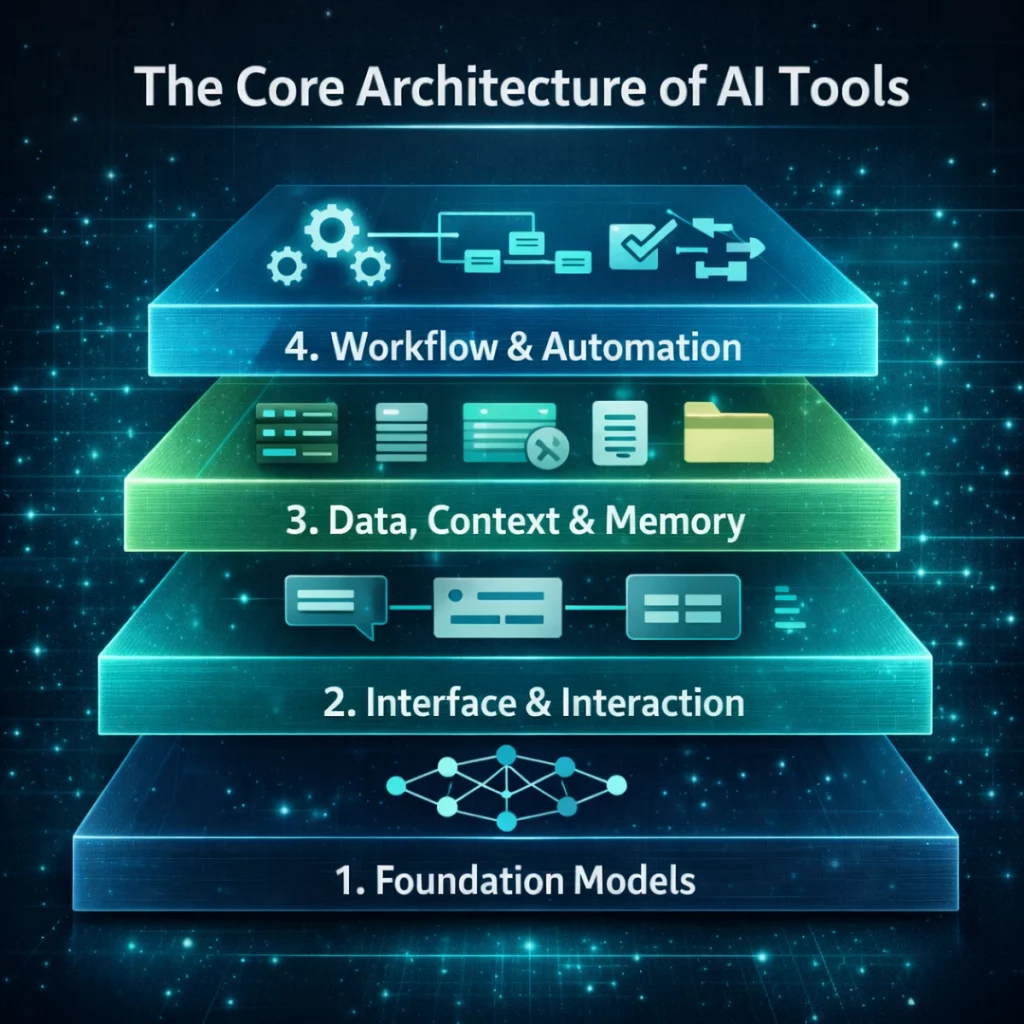
Layer 1: Foundation Models
At the base of every AI tool sits one or more foundation models.
Foundation models are large-scale AI systems trained to perform general tasks, such as generating language, analyzing images, or combining multiple types of input. They provide the core intelligence that AI tools rely on.
Importantly, foundation models are not tools. They do not define workflows, interfaces, or use cases. They generate predictions based on patterns learned during training. Everything else — from prompt handling to automation — is built on top of them.
Different types of foundation models exist, including:
- language-focused models used for writing, analysis, and reasoning
- image and video models used for visual generation
- multimodal models capable of processing text, images, audio, or a combination of inputs
The choice of model determines what a tool can do, but not how well it fits into real work. A powerful model sets the upper limit of performance, but usability, reliability, and productivity gains depend on the layers above it.
This distinction explains why tools built on similar models can feel radically different in practice — and why model quality alone is not a sufficient measure when evaluating AI tools.
For readers interested in how these models work internally — including training, architecture, and limitations — those foundations are covered in detail in our AI Guides.
Layer 2: Interface & Interaction Layer
If foundation models define what an AI tool can do, the interface layer determines what users are actually able to do with it.
This layer sits between human intent and machine capability. It translates vague goals into structured inputs the model can process, and it shapes how outputs are presented, refined, and reused. In practice, this layer has more impact on productivity and perceived quality than most users realize.
The interface layer includes everything that governs interaction, such as:
- prompt input fields
- templates and presets
- sliders, toggles, and configuration options
- chat-based conversations or form-driven workflows
Two AI tools may rely on similar underlying models, yet feel completely different because of how this interaction layer is designed.
A well-designed interface reduces cognitive load. It guides users toward effective inputs, prevents common mistakes, and exposes advanced capabilities without overwhelming beginners. Poor interfaces, by contrast, force users to “fight the tool,” even when the underlying AI is capable.
This is why AI tools built for productivity often emphasize clarity, structure, and speed. Tools in categories like AI Productivity Tools focus heavily on minimizing friction, while tools in AI Content Creation Tools often optimize for creative control and iterative refinement.
The interface layer also explains why prompts alone are not enough.
Many modern AI tools embed system-level instructions, hidden prompts, or predefined workflows that users never see directly. These elements shape how the model responds, how strictly it follows instructions, and how it balances creativity versus precision. As a result, copying the same prompt into two different tools rarely produces identical outcomes.
From a practical perspective, this means that choosing an AI tool is not just about model access. It is about how the tool helps users express intent, iterate on results, and move from output to action.
As AI tools mature, the interface layer increasingly becomes the main differentiator. Models continue to improve across the industry, but the tools that deliver consistent value are the ones that translate raw AI capability into intuitive, repeatable interaction.
Layer 3: Data, Context & Memory
Foundation models are inherently generic.
They generate responses based on patterns learned during training, not on an understanding of a specific user, organization, or situation. Without additional context, even advanced models can only produce broadly applicable outputs.
The data and context layer exists to solve that limitation.
This layer determines what information an AI tool can access beyond the model itself, and how that information is incorporated into responses. It is the difference between a tool that produces plausible answers and one that delivers relevant, reliable results.
Context can take many forms:
- uploaded documents or files
- internal knowledge bases
- databases and structured data
- browsing or retrieval mechanisms
- short-term or long-term memory
Tools that operate without this layer are effectively “stateless.” Each interaction starts from zero. While this can be sufficient for simple tasks, it quickly breaks down in professional environments where accuracy, continuity, and domain knowledge matter.
By contrast, tools that integrate data and context can tailor outputs to specific materials, users, or workflows. This is why AI tools used for research, analysis, and decision support behave differently from generic chat interfaces. Categories such as AI Research & Knowledge Tools rely heavily on context mechanisms to ground responses in verifiable sources.
Memory is a particularly important aspect of this layer.
Some tools retain conversational context only within a single session. Others store preferences, documents, or past interactions over time. This allows AI tools to adapt to users, reduce repetition, and support longer-term workflows — but it also introduces new considerations around privacy, data ownership, and security.
These trade-offs are especially relevant in business settings, where sensitive information may be involved. Understanding how a tool handles data, what is stored, and where processing occurs is a critical part of responsible AI use. This is explored further in our guide on How to Use AI Tools Safely (Privacy & Protection).
In practice, the presence or absence of a robust context layer explains why some AI tools scale well inside organizations while others remain best suited for individual, ad-hoc use. It also explains why tools that appear similar on the surface can differ dramatically in reliability when applied to real-world tasks.
Layer 4: Workflow, Automation & Execution Logic
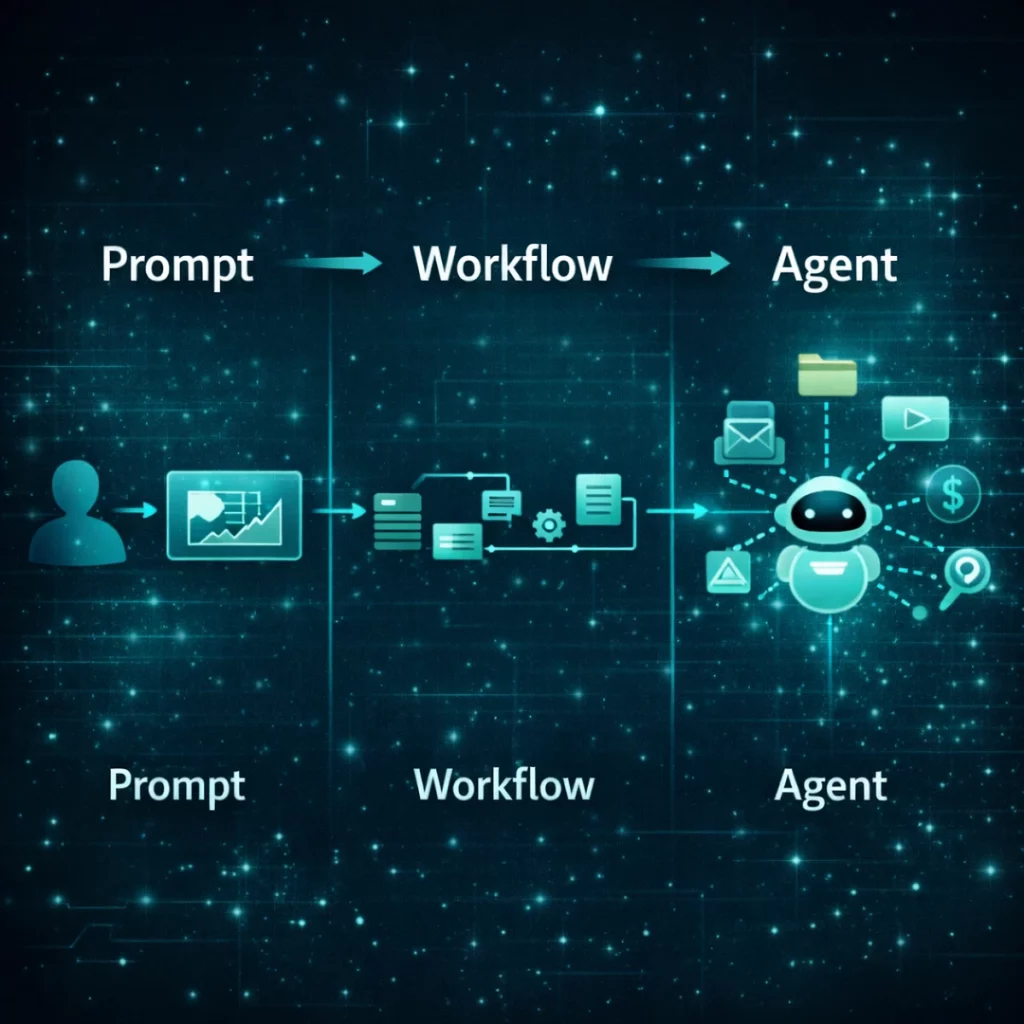
The final layer turns isolated AI interactions into repeatable systems.
Without this layer, AI tools operate as single-step assistants: you ask, they respond, and the process ends. While this can be useful for ad-hoc tasks, it does not scale. Real leverage emerges when AI outputs trigger follow-up actions, feed into other tools, or execute decisions automatically.
The workflow and automation layer defines how actions are sequenced and executed. It introduces elements such as:
- chaining multiple AI steps together
- triggering actions based on events or conditions
- passing outputs between tools or systems
- applying rules that control when and how AI is used
This is where AI tools move beyond productivity support and become part of operational processes. Categories like AI Business Automation Tools focus specifically on this layer, enabling organizations to embed AI into recurring tasks rather than isolated interactions.
At the most advanced end of this spectrum sit AI agents. Agents combine foundation models, context, and workflow logic into systems capable of acting autonomously within defined boundaries. Instead of responding to individual prompts, they monitor environments, make decisions, and execute actions across multiple steps.
Understanding this layer helps explain why some AI tools feel limited despite strong models, while others unlock outsized efficiency gains. It also clarifies why automation and agents represent a structural shift rather than a simple feature upgrade.
For readers looking to explore this in depth, practical applications are covered in guides on How to Build an AI Workflow and How to Use AI Agents.
Why Different AI Tools Produce Different Results
Users often assume that similar AI tools should produce similar outputs — especially when they appear to rely on the same underlying models. In practice, this is rarely the case.
Differences in results usually emerge above the model layer. Tools apply system-level instructions, prompt structures, safety filters, and context-handling mechanisms that shape how the model interprets inputs and generates responses. Even small variations in these elements can lead to meaningful differences in tone, accuracy, or consistency.
This explains why copying the same prompt into multiple tools often yields different outcomes, and why evaluating AI tools requires looking beyond model access alone. The surrounding system matters just as much as the AI at its core.
Understanding these differences also clarifies why transparent evaluation criteria are essential when comparing tools — a principle explored further in How to Compare AI Tools.
AI Tools vs AI Platforms vs AI Agents
Not all AI-driven systems serve the same role, even when they rely on similar technologies.
AI tools are designed to solve specific tasks. They focus on narrow functions such as writing, image generation, or analysis, and are typically optimized for direct user interaction.
AI platforms provide broader environments where multiple tools, data sources, and workflows coexist. They emphasize integration, extensibility, and consistency across use cases rather than single-task optimization.
AI agents represent the next step in this evolution. Instead of responding to individual inputs, agents operate autonomously within defined parameters. They combine models, context, and workflow logic to monitor situations, make decisions, and execute actions without constant human intervention.
This distinction is critical when navigating the AI tools landscape, particularly as agent-based systems become more common. Practical implications of this shift are explored in our AI Agents Guide and in coverage of Multimodal AI Tools.
What Understanding How AI Tools Work Changes in Practice
Once AI tools are understood as layered systems rather than standalone applications, the way they are evaluated and used changes fundamentally.
The most effective tools are not always the ones with the longest feature lists or the newest models. They are the ones that fit naturally into existing workflows, handle context reliably, and support automation where it matters.
This perspective shifts the focus from searching for a single “best” tool to designing combinations of tools that work together. It also highlights why decision frameworks and structured comparisons are essential for long-term value — topics covered in How to Choose the Right AI Tool and How to Compare AI Tools.
Where This Guide Fits in the AI Tools Ecosystem
Understanding how AI tools work at a system level changes how they are evaluated and used.
Rather than treating tools as isolated products, this perspective highlights how models, interfaces, context, and workflows combine to create real-world value — or limitations.
This guide provides the technical and functional foundation for the broader AI Tools Hub. From here, readers can explore category deep dives, practical guides on workflows and automation, and structured frameworks for choosing and comparing tools.
Together, these resources are designed to support informed decisions and effective use of AI tools in real-world environments.