AI tools are widely positioned as productivity multipliers — especially in software development. From intelligent code completion to full-function generation, AI assistants promise faster delivery, fewer errors, and reduced cognitive load.
But emerging evidence challenges that assumption.
Research reported by Fortune shows that experienced software developers completed certain tasks up to 20% slower when using AI coding assistants than when working without them.
This does not suggest that AI tools fail.
It reveals something more important: productivity behaves fundamentally differently once expertise, context, and system complexity are introduced.
Key Takeaways
- AI coding assistants do not automatically improve productivity for experienced developers and can introduce measurable friction.
- The slowdown is driven by cognitive overhead and workflow disruption — not poor AI output.
- Traditional productivity metrics fail to capture long-term quality, maintainability, and system complexity.
- AI delivers the most value when applied selectively to the right tasks and skill levels.
- Teams that treat AI as a support layer — not a default workflow — see more durable performance gains.
What This Research Actually Tells Us
A crucial detail often missed in headlines is who the research focused on.
The observed slowdown appeared primarily among experienced, professional developers — not junior engineers or students. That distinction matters.
Across controlled development tasks, researchers found that:
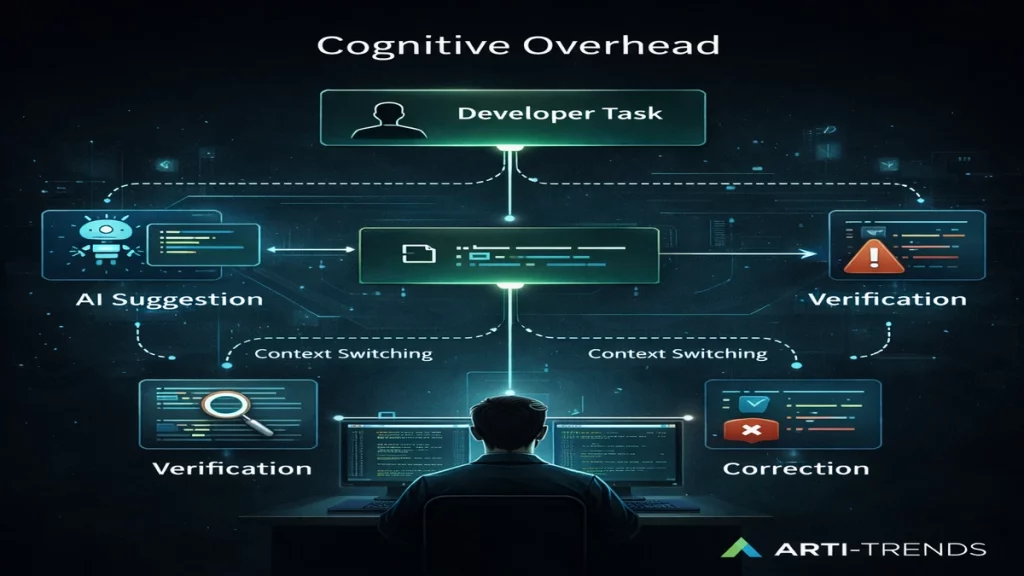
- AI-generated suggestions frequently required manual verification
- Subtle logic or architectural mismatches demanded correction
- Context switching disrupted deep focus
- Output volume increased, but confidence in correctness declined
The issue was not AI quality.
It was workflow interference inside already-optimized human systems.
The Real Cost: Cognitive Overhead, Not Execution Speed
Senior developers rarely optimize for speed alone. They optimize for:
- architectural coherence
- long-term maintainability
- system reliability
- risk avoidance
AI assistants introduce a new responsibility: evaluation.
Instead of directly building solutions, developers must:
- judge whether AI output aligns with system constraints
- identify edge cases invisible to the model
- validate assumptions the AI implicitly makes
This shifts work from creation to supervision — a fundamentally slower mode of operation.
This is precisely why teams that design AI workflows intentionally outperform those that simply add more tools.
Why Traditional Productivity Metrics Miss the Point
Most AI productivity claims rely on surface-level indicators:
- lines of code produced
- task completion time
- feature throughput
Experienced developers measure productivity differently.
They care about:
- downstream rework
- technical debt accumulation
- how easily future developers can reason about the system
AI tools can inflate short-term output while quietly increasing long-term complexity.
That trade-off rarely shows up in dashboards — but it becomes painfully visible over time.
This mismatch lies at the heart of the AI productivity paradox.
When AI Helps — and When It Hurts
A Practical Decision Framework
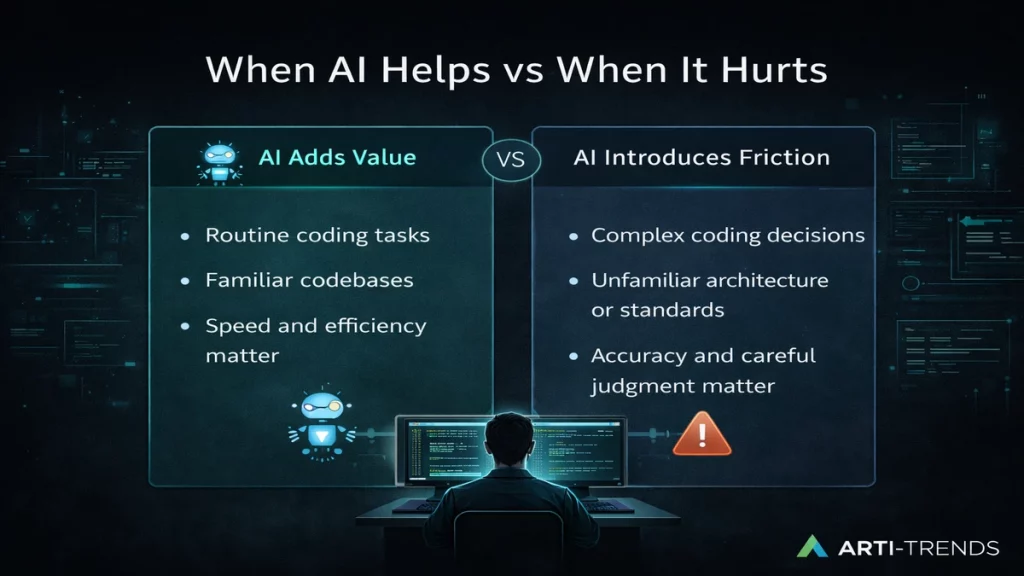
AI creates value when it reduces friction, not when it interrupts expert judgment.
Use AI when:
- generating boilerplate or repetitive code
- writing tests, mocks, or documentation
- prototyping ideas quickly
- working in unfamiliar languages or frameworks
- supporting junior developers during onboarding
Avoid AI when:
- designing core system architecture
- refactoring complex legacy systems
- implementing deeply contextual domain logic
- optimizing performance-critical components
- working inside stable, well-understood codebases
This is exactly where a decision framework for AI tools becomes essential — not to limit adoption, but to prevent misuse.
What High-Performing Teams Do Differently
Teams that benefit consistently from AI share clear patterns:
- AI usage is task-specific, not enforced
- Developers are trained to collaborate with AI, not defer to it
- Productivity is evaluated through quality and rework, not raw speed
- AI is treated as an assistant — never a decision-maker
Rather than chasing adoption metrics, these teams protect workflow integrity — often by deliberately constraining when and how AI is used.
A Better Mental Model for Workplace AI
AI does not automatically make experts faster.
Instead, it:
- accelerates learning for junior staff
- compresses experimentation cycles
- shifts effort from execution to evaluation
- rewards strong system thinking over raw output
This explains why many AI coding tools show mixed results in mature engineering environments: the limiting factor is no longer speed, but judgment.
Why This Matters for the Future of AI at Work
As AI tools become deeply embedded in professional workflows, the competitive advantage will not come from deploying more tools — but from knowing where restraint creates leverage.
The next phase of AI adoption is not about speed.
It is about judgment, context, and selective application.
That is where sustainable productivity lives.
Sources
This article draws on reporting by Fortune, which covered recent research examining how AI coding assistants affect the productivity of professional software developers. The analysis focuses on findings from controlled task-based evaluations involving experienced engineers, highlighting measurable slowdowns linked to workflow disruption and increased cognitive overhead rather than deficiencies in AI output quality.
Interpretation and contextualization are based on established software development practices and observed engineering workflows, with an emphasis on practical implications for teams adopting AI tools in real-world environments.