Most ChatGPT prompts fail for one simple reason: they are too vague. A prompt like “write a marketing plan” gives the model almost no context, no audience, no goal, no format, and no quality standard. The result may be readable, but it will usually be generic.
Better prompts work differently. They give ChatGPT a role, a clear task, useful context, specific constraints, and an expected output format. That small shift can dramatically improve the quality of answers you get for writing, research, strategy, marketing, coding, analysis, education, and everyday work.
This guide gives you practical ChatGPT prompt examples you can copy, adapt, and reuse. More importantly, it shows why each prompt works, so you can build your own high-quality prompts instead of relying on random prompt lists.
A good ChatGPT prompt tells the model who it should act as, what it should do, who the answer is for, what constraints matter, and how the output should be structured.
If you want the full strategic foundation behind prompting, start with our AI Prompt Writing Guide 2026. This article is the practical companion: real examples, quick fixes, reusable patterns, and a simple method for improving any prompt in minutes.
Quick Answer: What Makes a Good ChatGPT Prompt?
A good ChatGPT prompt usually includes six elements: role, context, task, audience, constraints, and output format. For example, instead of asking “write a sales email,” a stronger prompt says who ChatGPT should act as, what product is being sold, who the email is for, how long it should be, what structure to use, and what tone to avoid.
Here is the difference:
Weak prompt:
“Write a marketing plan.”
Better prompt:
“Act as a growth strategist for a B2B SaaS company with a $10k/month marketing budget. Draft a 3-month plan focused on retention and upsell. Return the answer in a table with week, objective, channel, action, and KPI.”
The better prompt works because it gives the model a role, context, business goal, budget constraint, timeframe, and output format. Instead of guessing what you mean, ChatGPT has a clear target.
The Simple Formula Behind Better ChatGPT Prompts
You do not need a complicated framework to improve most prompts. In many cases, the following formula is enough:
Role + Context + Task + Audience + Constraints + Format
The role tells ChatGPT what perspective to use. The context explains the situation. The task defines what you want done. The audience clarifies who the output is for. The constraints set boundaries such as length, tone, data, or scope. The format tells the model how to structure the answer.
This is why small wording changes can produce very different results. A vague prompt asks ChatGPT to guess. A strong prompt gives it a job description.
For a deeper explanation of structured prompting, read AI Prompt Frameworks Explained: The 4C Model and Beyond. Below, we’ll use a simpler five-step method you can apply immediately: the Prompt Refinement Ladder.
The Prompt Refinement Ladder
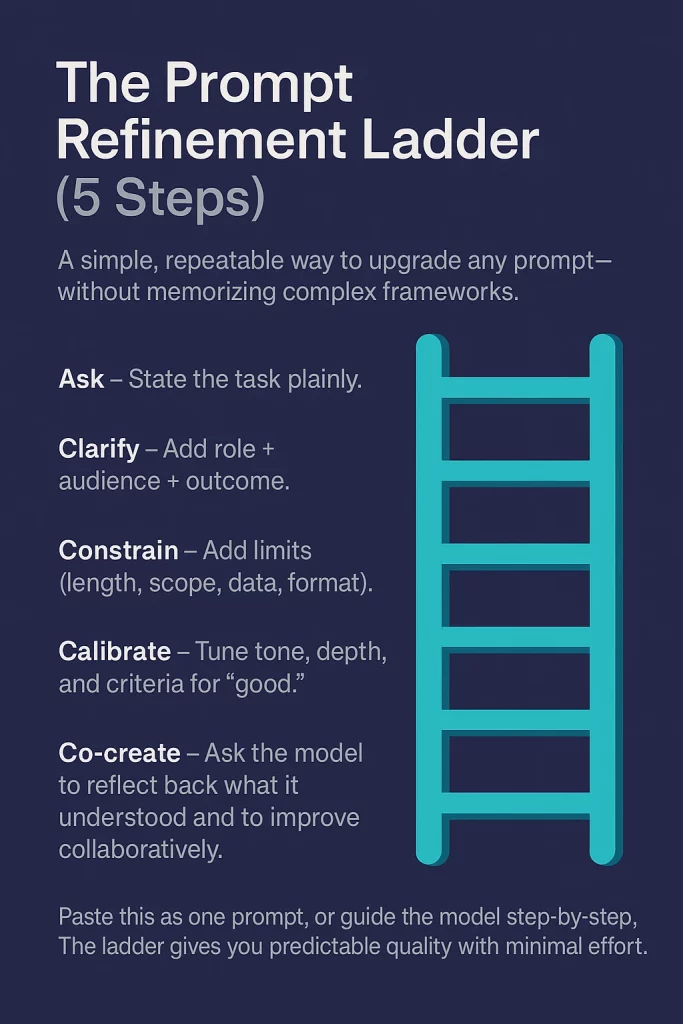
The Prompt Refinement Ladder is a simple way to improve almost any ChatGPT prompt without memorizing complex frameworks. Instead of trying to write the perfect prompt in one attempt, you improve it step by step: start with the basic task, add context, set boundaries, define quality, and invite the model to collaborate.
This method is especially useful when your first output feels too generic, too long, too shallow, or not specific enough. Rather than starting over, you can move up the ladder and add the missing information.
Better prompts are built in layers: ask, clarify, constrain, calibrate, and co-create.
| Step | What it does | Example upgrade |
|---|---|---|
| Ask | State the task clearly. | “Write an intro for a blog about AI productivity.” |
| Clarify | Add role, audience, and outcome. | “Act as a tech journalist writing for busy managers.” |
| Constrain | Set limits for length, scope, data, or format. | “Keep it to 120–150 words and mention three concrete benefits.” |
| Calibrate | Define tone, depth, and quality standards. | “Use a neutral-to-optimistic tone, avoid hype, and write in two short paragraphs.” |
| Co-create | Ask the model to check, improve, or offer alternatives. | “Before writing, list the three benefits you’ll include. After writing, suggest two alternate openings.” |
The power of this approach is that it turns prompting into a repeatable process. If the answer is vague, clarify the audience or goal. If the answer is too long, add constraints. If the tone is wrong, calibrate the style. If the result is close but not strong enough, ask ChatGPT to improve it against clear criteria.
For ready-made prompt structures that apply this same logic to SEO copy, ads, launch emails, content calendars, and creative workflows, explore our Prompt Templates for Marketers and Creators.
10 ChatGPT Prompt Examples You Can Copy and Adapt
The best way to learn prompting is to compare weak prompts with stronger versions. Each example below shows a common vague prompt, a better version you can copy, and the reusable pattern behind it.
You do not need to use these prompts word for word. Treat them as starting points. Replace the role, audience, context, format, or constraints based on your task.
1. Executive Summary Prompt
Weak prompt:
“Summarize this report.”
Better prompt:
“Act as a strategy analyst. Summarize this 15-page market report into a 250-word executive summary for non-technical executives. Highlight three trends, two risks, and one recommendation. Use concise bullet points.”
Why it works:
This prompt defines the role, audience, length, structure, and decision focus. Instead of generating a generic summary, ChatGPT knows what to prioritize and how the output should be used.
Reusable pattern:
Act as [role]. Summarize [source] for [audience]. Highlight [number] trends, [number] risks, and [number] recommendation. Use [format].
2. Product Comparison Prompt
Weak prompt:
“Compare these tools.”
Better prompt:
“Act as a procurement advisor. Compare Tool A and Tool B for a small remote team with a $2k/month budget. Create a table with four columns: feature, why it matters, Tool A, and Tool B. End with a one-paragraph recommendation.”
Why it works:
A comparison becomes useful only when the decision context is clear. This prompt adds budget, user type, evaluation criteria, and a required recommendation.
Reusable pattern:
Act as [advisor role]. Compare [Option A] and [Option B] for [user/team] with [constraint]. Use a table with [criteria]. End with a recommendation.
3. Sales Email Prompt
Weak prompt:
“Write a sales email.”
Better prompt:
“Act as an SDR selling cybersecurity training to HR directors. Draft a 120-word cold email using a problem → insight → next step structure. Include one piece of social proof and a soft CTA for a 10-minute call. Avoid jargon.”
Why it works:
This prompt gives ChatGPT a sales role, product category, target audience, structure, length, proof point, CTA, and tone constraint. That makes the email more focused and less generic.
Reusable pattern:
Act as [sales role] selling [product] to [audience]. Write a [length] email using [framework]. Include [proof point] and [CTA]. Avoid [tone/style issue].
4. Lesson Plan Prompt
Weak prompt:
“Create a lesson on climate change.”
Better prompt:
“Act as a high-school science teacher. Create a 45-minute lesson plan on climate change for grade 10 students. Include learning objectives, three classroom activities, one formative assessment, and a five-question exit quiz with answers.”
Why it works:
Education prompts become stronger when they include grade level, lesson duration, learning goals, activities, and assessment. This turns the output into something a teacher can actually use.
Reusable pattern:
Act as [teacher/trainer role]. Create a [duration] lesson on [topic] for [audience]. Include objectives, activities, assessment, and a short quiz with answers.
5. UX Review Prompt
Weak prompt:
“Improve this onboarding.”
Better prompt:
“Act as a senior UX designer for a fintech app. Review this three-screen onboarding flow for trust and clarity. Provide the top five friction points, three copy improvements, and two micro-interactions to add. Briefly reference relevant UX heuristics where helpful.”
Why it works:
This prompt tells ChatGPT what lens to use, what criteria matter, and what deliverables to return. It also narrows the review to trust and clarity instead of asking for vague design feedback.
Reusable pattern:
Act as [expert role]. Review [asset/process] for [quality criteria]. Provide [number] friction points, [number] improvements, and [number] recommendations.
6. SEO Content Brief Prompt
Weak prompt:
“Write a blog about remote work tools.”
Better prompt:
“Act as an SEO editor. Create a content brief for the keyword ‘best remote work tools 2026’. Include search intent, target reader, H2/H3 outline, 10 semantically related terms, internal link suggestions, and a 155-character meta description.”
Why it works:
This prompt separates briefing from drafting. It helps ChatGPT create the structure, SEO context, and semantic coverage before writing the article itself.
Reusable pattern:
Act as an SEO editor. Create a content brief for [keyword]. Include search intent, target reader, outline, semantic terms, internal links, and meta description.
7. Data Analysis Prompt
Weak prompt:
“Analyze this survey.”
Better prompt:
“Act as a data analyst. From the following survey results (n=532), identify three patterns, two anomalies, and one actionable insight. Then suggest one follow-up survey question to validate the insight. Use short bullet points.”
Why it works:
Using a 3-2-1 structure forces prioritization. Instead of producing a long summary, ChatGPT has to separate patterns, anomalies, insight, and next-step validation.
Reusable pattern:
Act as [analyst role]. From [data/source], identify [number] patterns, [number] anomalies, and [number] actionable insight. Suggest a follow-up question or next step.
8. Brainstorming Prompt
Weak prompt:
“Give ideas for a podcast.”
Better prompt:
“Act as a creative producer. Generate seven podcast episode ideas for first-time founders. For each idea, include a title of eight words or fewer, a one-sentence hook, and a suggested guest profile. Sort the ideas from lowest-effort to highest-effort to produce.”
Why it works:
Brainstorming improves when you add an audience, output structure, and sorting rule. This makes the ideas easier to evaluate and act on.
Reusable pattern:
Act as [creative role]. Generate [number] ideas for [audience/use case]. For each, include [fields]. Sort by [priority rule].
9. Coding Helper Prompt
Weak prompt:
“Write a Python script for CSV emails.”
Better prompt:
“Act as a senior Python developer. Write a script that validates and deduplicates email addresses in a CSV file with columns name,email. Handle empty values, trim whitespace, lowercase domains, and output valid.csv and rejected.csv with rejection reasons. Include comments in the code.”
Why it works:
Coding prompts work best when they define the input, expected output, edge cases, and quality requirements. This gives ChatGPT concrete acceptance criteria.
Reusable pattern:
Act as [developer role]. Write code that takes [input], performs [task], handles [edge cases], and outputs [files/results]. Include [comments/tests/error handling].
10. Strategy Memo Prompt
Weak prompt:
“How do we reduce churn?”
Better prompt:
“Act as a SaaS retention lead. Draft a one-page memo to our executive team covering: the top three churn drivers for our SMB segment, a 90-day plan with owners and milestones, and forecasted impact. Assume MRR is $400k and monthly churn is 4.2%.”
Why it works:
This prompt turns a broad strategy question into an executive-ready deliverable. It adds role, business context, metrics, timeframe, ownership, and expected impact.
Reusable pattern:
Act as [leadership role]. Draft a [format] for [audience] covering [decision areas]. Include [timeframe], [owners/milestones], and [metrics/impact].
These examples all follow the same basic logic: define the role, explain the context, state the task, add constraints, and specify the output format. Once you recognize that pattern, you can adapt it to almost any work task.
Personalizing Prompts to Your Voice or Brand
Once your prompt has the right structure, the next step is personalization. ChatGPT can produce a technically correct answer that still feels wrong if the tone does not match your voice, brand, audience, or communication style.
This is why strong prompts often include a short style instruction. Instead of simply asking for “a professional tone,” describe how the output should feel to the reader. Should it be concise, strategic, friendly, direct, persuasive, analytical, or beginner-friendly? Should it avoid jargon, hype, clichés, long paragraphs, or overly formal language?
Good prompting is not only about what you want ChatGPT to say. It is also about how the answer should sound.
A simple way to control tone is to add a reusable voice block to the end of your prompt. For example:
Tone and style: Write clearly and concisely. Use short paragraphs, concrete examples, and practical language. Avoid hype, jargon, clichés, and generic claims. Prefer specifics over broad statements. Make the answer useful for a busy reader.
You can adapt this block for different situations. A brand article may need a confident editorial tone. A sales email may need to feel warm and direct. A technical explanation may need to be precise and structured. A social media post may need to be sharper, shorter, and more conversational.
If you already have a writing sample that matches your preferred style, you can also give ChatGPT a voice reference:
Mirror the tone, rhythm, sentence length, and vocabulary of the sample below. Keep the same level of clarity and directness, but do not copy phrases word for word.
This works especially well for brands, newsletters, founder-led content, sales copy, and recurring content formats. Over time, you can save your best tone instructions as part of your prompt library so every output starts from the same style baseline.
For more ready-to-use structures, explore our Prompt Templates for Marketers and Creators, where brand voice rules are turned into practical templates for content, campaigns, SEO, and creative workflows.
Troubleshooting: Why ChatGPT Gives Weak Answers
Even a well-written prompt will not always produce the perfect answer on the first try. That does not mean the model failed. In many cases, weak output is a signal that the prompt is missing context, constraints, format, tone, or success criteria.
The fastest way to fix a weak answer is to diagnose what went wrong. Is the response too generic? Too long? Off-tone? Poorly structured? Once you identify the problem, you can usually improve the output with one targeted follow-up prompt.
Bad AI output is often not a dead end. It is feedback on what your prompt failed to specify.
| Problem | What it usually means | Quick fix prompt |
|---|---|---|
| Too generic | The prompt is missing role, audience, or context. | “Act as [role] for [audience]. Use the following context: [context]. Make the answer specific to this situation.” |
| Too long or rambling | The prompt does not define length, structure, or priority. | “Rewrite this in 180–200 words. Use three short bullets and one clear takeaway.” |
| Wrong tone | The prompt does not explain how the answer should sound. | “Rewrite this in a clear, practical tone. Avoid jargon, hype, clichés, and overly formal language.” |
| Unstructured | The prompt does not specify an output format. | “Return this as a table with columns for issue, recommendation, priority, and next step.” |
| Too shallow | The prompt does not include quality criteria or evaluation standards. | “Briefly explain your approach, then improve the answer using these criteria: [criteria].” |
| Off-target | The goal or metric is unclear. | “Optimize the answer for [goal or metric]. Remove anything that does not support that outcome.” |
The pattern is simple: do not restart from scratch too quickly. Use the weak answer to identify the missing instruction, then refine the prompt using the Prompt Refinement Ladder. Clarify the goal, add constraints, calibrate the tone, and define what a good answer should include.
For example, if ChatGPT gives you a generic marketing plan, do not just ask “make it better.” Instead, add the missing business context:
“Revise this plan for a B2B SaaS company targeting HR managers. Focus on retention and upsell, limit the plan to three channels, and include one measurable KPI per action.”
That kind of follow-up gives the model a clearer target and usually produces a much stronger second answer.
If you keep running into the same problems, read our Common Prompt Writing Mistakes guide for deeper examples and practical fixes.
Build Your Prompt Library
Once you find prompts that consistently produce useful results, do not leave them buried in old chats. Save them. A prompt library turns individual examples into a reusable system you can improve over time.
This does not need to be complicated. You can build a simple prompt library in Notion, Obsidian, Google Docs, Airtable, or any tool you already use. The goal is not to collect hundreds of random prompts. The goal is to save the patterns that actually work for your tasks.
A good prompt library is not a folder of clever prompts. It is a system for reusing clear thinking.
Start by organizing prompts by use case. For most people, simple categories are enough: strategy, SEO, copywriting, email, education, product, analysis, coding, research, and brainstorming. Each saved prompt should also include tags such as role, audience, format, tone, goal, and metric, so you can quickly find the right structure later.
The most useful prompt libraries include more than the prompt itself. Add a short note explaining when the prompt works, what kind of output it produces, and what you changed after testing it. This makes the library easier to improve instead of becoming another static document nobody uses.
A Simple Prompt Library Template
Use the following fields for each saved prompt:
| Field | What to include |
|---|---|
| Prompt name | A short, searchable name such as “SEO Content Brief” or “Sales Email Draft”. |
| Use case | The task category: SEO, strategy, email, analysis, coding, education, or another workflow. |
| Role | The expert perspective ChatGPT should use. |
| Audience | Who the output is for. |
| Context | The background information the model needs. |
| Goal | What the output should achieve. |
| Format | The structure: table, memo, outline, bullets, checklist, email, script, or brief. |
| Constraints | Length, tone, scope, data limits, sources, or things to avoid. |
| Acceptance criteria | What a good answer must include before you consider it usable. |
| Notes | What worked, what failed, and how you improved the prompt. |
Start with the 10 ChatGPT prompt examples above. Each time one works, save it as a reusable template. Each time one fails, do not delete it immediately. Annotate why it failed, adjust the role, context, constraints, or format, and test it again.
Over time, your prompt library becomes more valuable than any public prompt list because it is built around your actual work, your preferred style, your recurring tasks, and your own quality standards.
To expand beyond your own library, explore our guide to Best Prompt Libraries & Communities for AI Creators. If you want dedicated software for testing, organizing, and scaling prompts, see our overview of Top AI Prompt Tools.
Conclusion: Better Prompts Are Better Thinking
Strong ChatGPT prompts are not magic phrases. They are clear instructions built from context, purpose, constraints, and expected output. When your prompt explains who the answer is for, what the task should achieve, and how the response should be structured, the quality of the output improves dramatically.
The 10 ChatGPT prompt examples in this guide all follow the same principle: vague requests create vague answers, while structured prompts give the model a clear job to do. Whether you are writing an executive summary, creating a sales email, building an SEO brief, analysing data, or drafting a strategy memo, better inputs lead to better outputs.
Prompting is not about memorising clever commands. It is about learning to think clearly enough for AI to help you.
Use the Prompt Refinement Ladder whenever an answer feels too generic, too long, too shallow, or off-target. Start with the basic task, clarify the role and audience, add constraints, define quality, and then ask ChatGPT to help refine the result. That process turns prompting from trial and error into a repeatable skill.
The real advantage appears when you stop treating prompts as one-off requests and start building a prompt library around your recurring work. Save what works, improve what fails, and turn your best prompts into reusable patterns for writing, strategy, marketing, research, coding, analysis, and everyday productivity.
As AI tools become more capable, the value of prompting will not disappear. It will become more important. The people who get the best results will be those who can define problems clearly, set useful constraints, and guide AI systems toward practical outcomes.
Update September 7, 2026: This article was refreshed to improve internal context and discovery signals.
Related Reading
Continue with these guides from the Arti-Trends prompt cluster:
- AI Prompt Writing Guide 2026 — the complete foundation for modern prompting.
- AI Prompt Frameworks Explained — learn the 4C model and other structured prompting systems.
- Prompt Templates for Marketers and Creators — ready-to-use structures for content, campaigns, and workflows.
- Common Prompt Writing Mistakes — diagnose weak prompts and fix them faster.
- AI Prompts for Business and Strategy — practical prompts for decision-making and operations.
- Top AI Prompt Tools — tools for saving, testing, and scaling prompt workflows.
For the full overview, visit the AI Prompts Hub.
Frequently Asked Questions
What are ChatGPT prompt examples?
ChatGPT prompt examples are sample instructions that show how to ask ChatGPT for better answers. A good example usually includes a role, context, task, audience, constraints, and output format, so the model understands what kind of response you need.
What is the fastest way to improve a ChatGPT prompt?
The fastest way to improve a ChatGPT prompt is to add context, constraints, and a clear output format. Instead of asking a vague question, explain who the answer is for, what the goal is, how long the response should be, and what structure you want.
What should every good ChatGPT prompt include?
A strong ChatGPT prompt usually includes six elements: role, context, task, audience, constraints, and format. These elements help ChatGPT understand the perspective it should use, the problem it should solve, and how the final answer should be delivered.
Should I use long prompts or short prompts?
Short prompts are useful for simple tasks, but more complex work usually needs more detail. The best prompt is not always the longest one. It is the prompt that gives ChatGPT enough context and constraints to produce a useful answer without adding unnecessary information.
Why does ChatGPT sometimes give generic answers?
ChatGPT often gives generic answers when the prompt is missing context, audience, goal, tone, or format. If the output feels vague, add a role, explain the situation, define the desired outcome, and tell ChatGPT how to structure the response.
Are prompt templates better than writing prompts from scratch?
Prompt templates are useful because they give you a proven structure to start from. However, the best results usually come from adapting templates to your specific task, audience, data, tone, and success criteria instead of copying them without changes.
How do I keep ChatGPT output consistent?
To keep ChatGPT output consistent, reuse the same role, tone instructions, format rules, and acceptance criteria across similar tasks. Building a prompt library helps you save effective prompts and apply the same structure to recurring workflows.
Can ChatGPT prompts be used for business tasks?
Yes. ChatGPT prompts can support business tasks such as writing executive summaries, comparing tools, drafting sales emails, creating SEO briefs, analysing survey data, preparing strategy memos, and brainstorming campaign ideas. The key is to include business context, metrics, audience, and format.
How do I build a prompt library?
Start by saving prompts that consistently produce useful results. Organize them by use case, such as SEO, strategy, email, analysis, coding, research, or brainstorming. For each prompt, document the role, context, goal, format, constraints, and notes about what worked.
Do better prompts always guarantee better answers?
Better prompts usually improve output quality, but they do not guarantee perfect answers. ChatGPT can still misunderstand context, miss details, or produce weak reasoning. Always review important outputs, refine the prompt when needed, and check facts before using results professionally.
{ “@context”: “https://schema.org”, “@type”: “FAQPage”, “mainEntity”: [ { “@type”: “Question”, “name”: “What are ChatGPT prompt examples?”, “acceptedAnswer”: { “@type”: “Answer”, “text”: “ChatGPT prompt examples are sample instructions that show how to ask ChatGPT for better answers. A good example usually includes a role, context, task, audience, constraints, and output format, so the model understands what kind of response you need.” } }, { “@type”: “Question”, “name”: “What is the fastest way to improve a ChatGPT prompt?”, “acceptedAnswer”: { “@type”: “Answer”, “text”: “The fastest way to improve a ChatGPT prompt is to add context, constraints, and a clear output format. Instead of asking a vague question, explain who the answer is for, what the goal is, how long the response should be, and what structure you want.” } }, { “@type”: “Question”, “name”: “What should every good ChatGPT prompt include?”, “acceptedAnswer”: { “@type”: “Answer”, “text”: “A strong ChatGPT prompt usually includes six elements: role, context, task, audience, constraints, and format. These elements help ChatGPT understand the perspective it should use, the problem it should solve, and how the final answer should be delivered.” } }, { “@type”: “Question”, “name”: “Should I use long prompts or short prompts?”, “acceptedAnswer”: { “@type”: “Answer”, “text”: “Short prompts are useful for simple tasks, but more complex work usually needs more detail. The best prompt is not always the longest one. It is the prompt that gives ChatGPT enough context and constraints to produce a useful answer without adding unnecessary information.” } }, { “@type”: “Question”, “name”: “Why does ChatGPT sometimes give generic answers?”, “acceptedAnswer”: { “@type”: “Answer”, “text”: “ChatGPT often gives generic answers when the prompt is missing context, audience, goal, tone, or format. If the output feels vague, add a role, explain the situation, define the desired outcome, and tell ChatGPT how to structure the response.” } }, { “@type”: “Question”, “name”: “Are prompt templates better than writing prompts from scratch?”, “acceptedAnswer”: { “@type”: “Answer”, “text”: “Prompt templates are useful because they give you a proven structure to start from. However, the best results usually come from adapting templates to your specific task, audience, data, tone, and success criteria instead of copying them without changes.” } }, { “@type”: “Question”, “name”: “How do I keep ChatGPT output consistent?”, “acceptedAnswer”: { “@type”: “Answer”, “text”: “To keep ChatGPT output consistent, reuse the same role, tone instructions, format rules, and acceptance criteria across similar tasks. Building a prompt library helps you save effective prompts and apply the same structure to recurring workflows.” } }, { “@type”: “Question”, “name”: “Can ChatGPT prompts be used for business tasks?”, “acceptedAnswer”: { “@type”: “Answer”, “text”: “Yes. ChatGPT prompts can support business tasks such as writing executive summaries, comparing tools, drafting sales emails, creating SEO briefs, analysing survey data, preparing strategy memos, and brainstorming campaign ideas. The key is to include business context, metrics, audience, and format.” } }, { “@type”: “Question”, “name”: “How do I build a prompt library?”, “acceptedAnswer”: { “@type”: “Answer”, “text”: “Start by saving prompts that consistently produce useful results. Organize them by use case, such as SEO, strategy, email, analysis, coding, research, or brainstorming. For each prompt, document the role, context, goal, format, constraints, and notes about what worked.” } }, { “@type”: “Question”, “name”: “Do better prompts always guarantee better answers?”, “acceptedAnswer”: { “@type”: “Answer”, “text”: “Better prompts usually improve output quality, but they do not guarantee perfect answers. ChatGPT can still misunderstand context, miss details, or produce weak reasoning. Always review important outputs, refine the prompt when needed, and check facts before using results professionally.” } } ] }